
For landscapers and lawn care
Websites for landscapers that fill the diary, not just the spring.
A landscaping website that gets you found in the towns you cover and takes quote requests with photos of the garden. It keeps your regular customers coming back each season, then asks for the review.
- A page for every service and every town
- Quote forms that take photos of the garden
- Seasonal emails to your regular customers
- Every enquiry in one inbox
Where the work goes
Five ways a landscaping business loses work it should have had.
None of them is about the website looking nice. Each one is a moment when somebody wanted their garden done and could not get you.
Every enquiry arrives in the same three weeks of spring.
The chat on your site answers from your own pages while you are out on a job: the services you offer, the towns you cover, how soon you can come. It takes their details, and every chat, form and call lands in one inbox as a contact you can move from new to quoted to booked.
Chat and inboxYou cannot price a patio from "how much for my garden?"
Your quote form asks what you need to know: the job, the rough size of the garden, the budget, when they want it done. They can attach photos straight from their phone, and the pictures arrive with the enquiry.
Quote formsLast year's mowing customers have not rung back.
Every customer is kept as a contact, tagged by the work you did for them. Send a first-cut-of-spring email to everyone tagged lawn care, or a follow-up a few days after a quote. Follow-ups are saved switched off until you read them. Texts go only to people who opted in, with the SMS add-on.
Email follow-upsYour best garden of the year is on your phone, not your site.
Send the before and after photos and they go on a project page. A post for Facebook and Instagram is written for you and goes out when you schedule it. Mark the job complete and the customer can be asked for a Google review.
Social posts and reviewsThey cannot tell whether you cover their town.
Ask for a page for each town you work in and each service you want to be called for: lawn care, patios, planting, fencing, clean-ups. Each page has its own title and description for search.
Pages and SEOOne job, start to finish
What happens when somebody decides on Saturday night that the garden needs doing.
Each step is something Mondovo does today. The firm is made up.
- Sat 20:15Town page
Found
They search for a landscaper in their town and land on your page for that town.
- 20:19Quote form
Quote requested
Your form asks about the job and the size of the garden. They attach three photos from their phone.
- 20:19Inbox and alerts
You hear about it
It lands in your inbox as a contact, photos included, and in your team channel if you want it there.
- 20:21Bookings
Visit booked
They pick a time for a site visit from your real availability.
- Tue 07:00Reminders
Reminded
You get the day's bookings by email. They get a reminder an hour before, by text if you add SMS.
- Two weeks onReview request
Asked for a review
The patio is laid. You mark the job complete and a link to your Google review page goes to the customer.
- The next daySocial posts
Posted
Your before and after photos become a post for Facebook and Instagram, written for you. It goes out when you schedule it.
- October
Followed up
An autumn clean-up email goes to every garden customer, from your own domain, once you have read and switched it on.
Illustration using a demo business, Evergreen Gardens Landscaping. Not a customer.
Behind the site
The website, and everything a landscaping business runs on it.
One account and one login. Here is what comes with a live site, what is an add-on, and what uses credits.
- Included
- Comes with every live site on Pro.
- Add-on
- A per-site extra you switch on in Billing.
- Credits
- Creative Studio work, priced before it is made.
Get found
Catch the job
Keep the customer
Stay busy
Change it any way you like
Edit the site from wherever you are standing.
No developer and no waiting. Change it when the season does. Every change is kept, so anything can be put back.
- In the editorClick the text and type. Swap a photo. Add a page for snow clearing when winter comes.
- By asking in the dashboardSay what is wrong in a sentence, like "put the spring aeration offer on the lawn care page", and it is done.
- Out loudDictate a change, or talk it through, from the truck.
- On WhatsAppMessage Mondovo, send a photo of the finished garden, and approve the change with a tap.
- Slack, Teams, Discord or Google ChatNew quote requests and bookings posted to your team's channel. In Slack, confirm a booking or ask Mondovo a question.
- Claude or ChatGPTConnect Mondovo to the assistant you already use and ask for the page, the post or the email.
What is on your landscaping site
What a good landscaping website has. Yours starts with all of it.
Drafted from a few sentences about the business. You read the plan for every page before anything is designed, and change what is wrong.
Use your own photographs of the work. A generated picture of a garden you did not build is a promise you will have to explain at the gate.
- A number you can tap to call, at the top of every page
- A page for each service: lawn care, design, patios, planting, fencing
- A page for each town or area you cover
- Before and after photos of your own gardens
- A quote form that takes photos and the size of the job
- Online booking for site visits and small jobs
- Seasonal services, like aeration, leaf clearing and snow removal
- Prices or starting prices, if you publish them
- Your licence, insurance and any certifications
- Reviews from your customers
- A chat that answers when you are out on a job
- Questions people ask: how often you mow, what happens in the rain, who removes the green waste
Three looks
Real landscaping sites, each built from a few sentences.
Each round gives you three complete versions from one content plan. Same pages and words; only the look changes. A site can hold up to ten, and you choose which one is live.
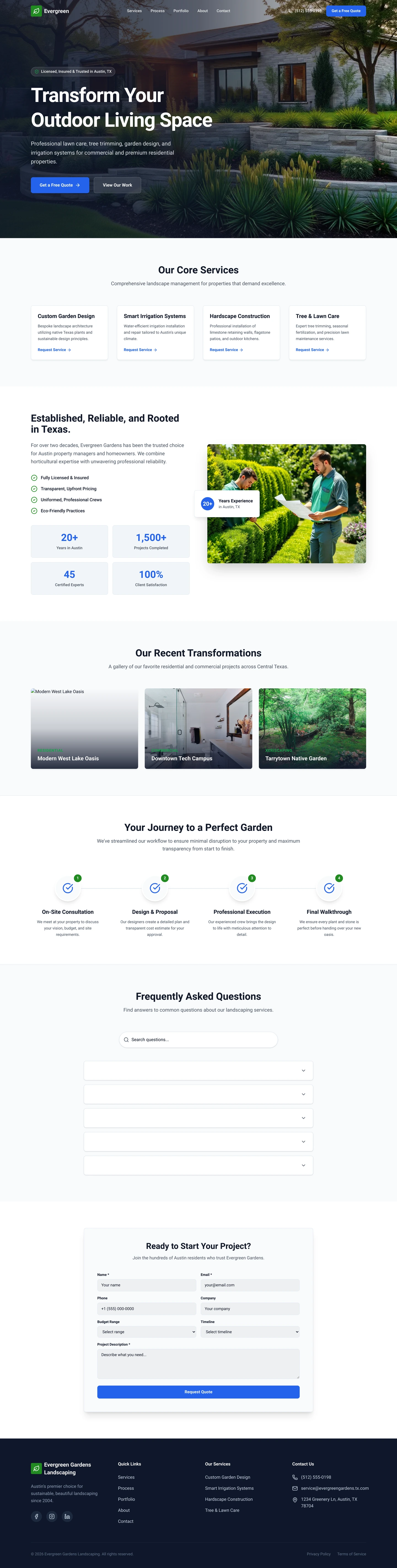
A finished garden behind the headline, blue buttons.
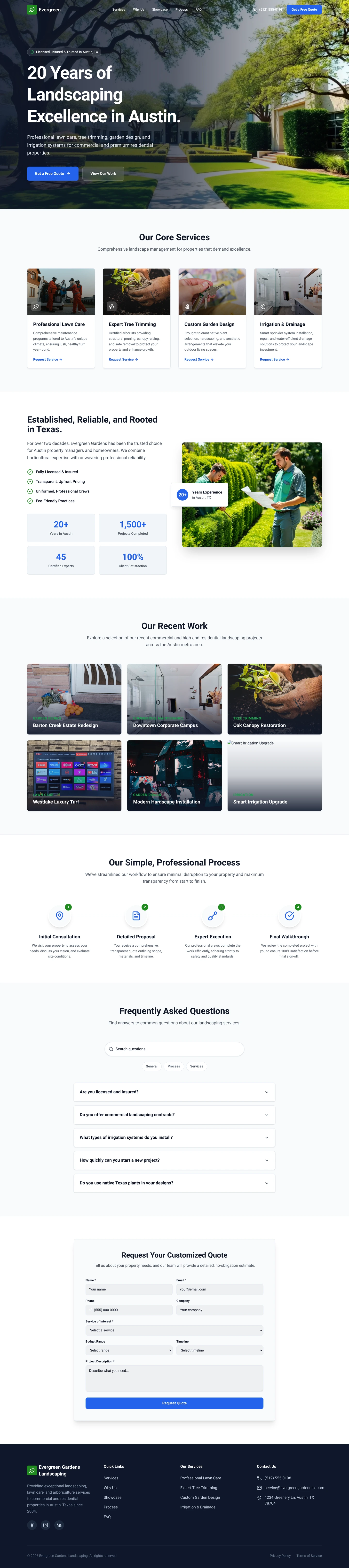
Twenty years in the headline, a lawn in the light.
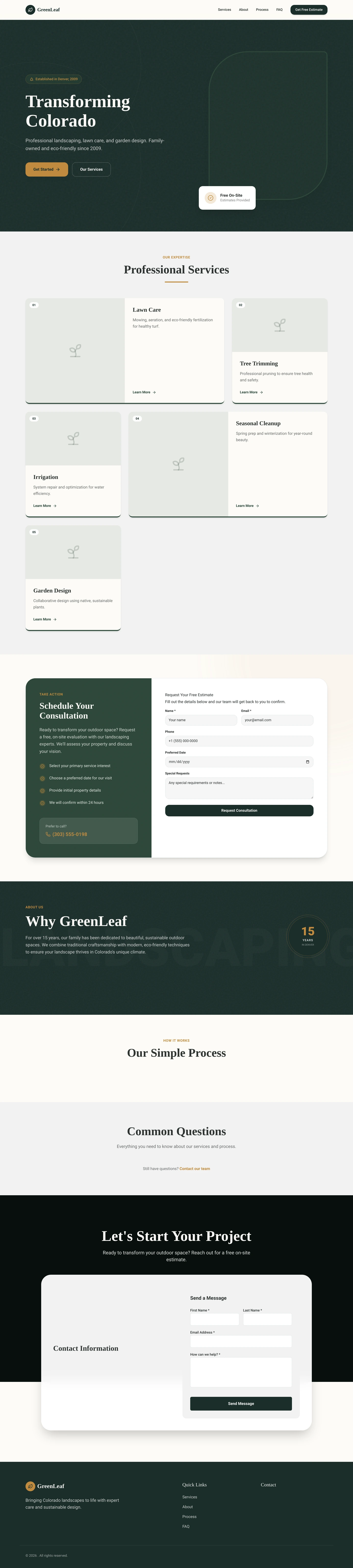
Deep green, a serif headline, a free estimate up front.
Real generated sites for two invented landscaping firms, shown as demonstrations rather than customers. The firms and everything written on them are invented.
See more in the galleryBeing straight with you
What it does not do.
It does not measure or price jobs
No estimating or takeoff software. Quote requests arrive with the details and photos you ask for; the pricing stays with you.
It does not run your rounds
Planning mowing routes, scheduling crews and sending invoices stay where they are now.
It answers calls, it does not make them
The Voice Agent answers incoming calls and takes callbacks. It does not ring customers or transfer a live call.
What it costs
Build free. Go live with Pro.
Pro is one price per live site, per month, shown in your currency on the pricing page.
- Building, designs and previews
- Free
- Going live, hosting, SSL
- Pro
- Bookings, chat, forms, inbox
- Included
- Pages, visitors, enquiries
- Not counted
- Voice Agent, text messages
- Per-site add-ons
- Logos, graphics, video
- Credits
Editing the site, by hand, by chat or by voice, never uses credits. Your phone provider bills you directly for the number and call minutes.
See pricing for your countryQuestions
Asked between jobs.
I do not have time to build a website.
Describe the business in a few sentences: what you do, which towns you cover, how long you have done it. A complete site is drafted from that, and you read a plan of each page before anything is designed.
Can customers send me photos of their garden?
Yes. Your quote form can ask for photos, and people attach them from their phone. The pictures arrive with the enquiry in your inbox, next to the size of the job and anything else you asked.
How do I keep my regular customers coming back?
Every customer is kept as a contact you can tag, such as lawn care or design. Send a seasonal email to a tag, or set a short series after a quote or a job. Follow-ups are saved switched off until you read them. Texts need the SMS add-on and go only to people who opted in.
Can it answer my phone while I am mowing?
Yes, with the Voice Agent add-on. Point your Twilio, Plivo or Exotel number at your site and it answers from what your site says, books a visit or takes a callback, and saves the caller. You can talk to it in your browser before you connect a number.
Will people find me?
Every page has its own title and description, publishing adds a sitemap and structured data, and a page for each service and town gives search something to match. Rankings depend on many things and are not guaranteed.
I already have a site.
Give it the address. The pages and words come across, and the design is rebuilt around them. You see what it found before anything is generated.
Your business
Say what you do and which towns you cover.
Building and trying designs is free, and nothing is public until you say so.
Also build or renovate? See trades and construction