
Webflow alternative
A Webflow alternative: three designs from one plan, not three hand builds.
Mondovo is a Webflow alternative for agencies that would rather not hand-build every client site. Approve a page-by-page content plan and it generates three complete multi-page designs from it. Your client opens a review link, clicks any element and leaves a note against it, and after launch changes text and images on the page themselves.
Free plan available. No credit card required.
The short version
Read this first, and you may not need the rest of the page.
This is the part most comparison pages bury. It is at the top here because it saves you a decision you were going to make anyway.
Choose Mondovo if
- You want three complete directions in front of a client in one round rather than three builds.
- You are pitching, and would rather the work cost nothing until something goes live.
- The client will change their own text and images after launch, and you would rather they did.
- You want the review link, the enquiry inbox, per-page SEO and version history without assembling them.
Choose Webflow if
- You need to export the code and take the project somewhere else later.
Capability
Side by side.
Quoted text belongs to Webflow. Rows are limited to things we could confirm from their published pages.
A dash means we could not confirm it from Webflow's own published pages, so we make no claim either way.
| Mondovo | Webflow | |
|---|---|---|
| Getting three directions in front of a client | Three complete multi-page designs per round, all generated from one content plan you approved. Up to ten designs can live on one site, and the live one is a switch. | The site is composed in the Designer, and Webflow AI is listed on every Site plan. Whether it produces several complete directions from one brief is not something we could confirm from Webflow's pages. |
| What one published site costs | $20 per live site per month, and drafts are free. | A Site plan per site: Basic $15 a month or Premium $25 a month, billed yearly. "All prices in USD, per site, per month, plus applicable taxes at checkout." |
| Publishing to the client's domain | Included. Custom domain, hosting and SSL come with the $20. | "A paid Site plan is required to publish to a custom domain." Before that, the free Workspace plan carries two staging sites on webflow.io addresses. |
| People who can work on it | 3 team members included, then $10 a month each. | "One full seat is included for the Workspace owner." Full and limited seats: "Add more seats for a separate fee." Agency and freelancer guests are free and do not use seats. |
| Getting a client to review it before launch | A review link that works on desktop and mobile. The client clicks an element on the page and leaves a note against it, or approves the whole site. | "Comment-only links — Share a site link to allow people without a Webflow account to review and comment." |
| What a non-developer changes after launch | Text and images, edited on the page. Enquiries arrive in the site's own inbox and become contacts with a timeline. | "Limited seats — Edit content or build pages with components. Add more seats for a separate fee." |
| Form submissions | Not billed, and unlimited on Pro. | "50 form submissions" on the free Starter Site plan. "Unlimited form submissions" from Basic upwards. |
| After launch: posts, emails and creative | Posts written for you, published to your connected Instagram and Facebook when you schedule them. Emails to your list and follow-ups that start from the site's forms and bookings, drafted for you to read. Creative Studio makes images, short videos with captions and logos in the site's colours. | — |
| Working from Claude or ChatGPT | An MCP connector: build and edit the site, add pages, draft posts and emails, and publish, from inside the conversation. | An official Webflow MCP server, which Webflow says "connects agents and AI tools directly to your Webflow projects". |
Webflow does far more than nine rows can hold. These are the rows where the difference actually decides something.
The trade, stated plainly
Three directions in one round, not three builds.
A Webflow build is composed by hand. That is the point of it, and it is why a second direction costs a second build. The difference is what happens when a client wants to see three.
Webflow is hand-built, and priced like it
A skilled Webflow designer composes layout, breakpoints and interactions by hand and can export the code at the end. That is craft, and it is paid for in hours — per direction.
But a second direction costs a second build
Showing a client three finished directions in Webflow means building three. Mondovo generates three complete multi-page designs from one approved content plan in a single round, and you can run another round if none of them lands.
The client's own edits after launch
On a Mondovo site, text and images are changed on the page and enquiries land in the site's inbox. Webflow's answer is a seat with a role, and its plan table prices full and limited seats as "a separate fee".
Two subscriptions, not one
A Site plan is bought per site. A Workspace plan is bought once, and it is what carries the seats and the staging sites. That is a structure rather than a criticism, and it is worth knowing before you build a quote on it.
What each one costs
One subscription against two, plus seats.
The two price lists are not the same shape, so the only fair way to compare them is against the number of live client sites you actually run.
Mondovo
$20 per live site per month
Drafts are free — 50 of them on Pro — and one live site is included in the first $20. Each extra live site is another $20. Pages, visitors and form submissions are not billed. Three team members are included, then $10 a month each. White-label, API access and the outreach tools are a $99 a month add-on.
Webflow
A Site plan per site, plus a Workspace plan
Site plans: Starter free, Basic $15 a month, Premium $25 a month, billed yearly — "All prices in USD, per site, per month." Workspace plans are separate: Starter free, Core $19 a month, Growth $49 a month, billed yearly. Full and limited seats are "a separate fee". Platform plans begin with Team at $2,500 a month on an annual contract.
Count the Workspace plan and the seats as well as the Site plans before you compare. A Webflow Site plan is only needed once a site publishes to a custom domain — before that, the free Workspace plan carries two staging sites — so both platforms let you build something for nothing. The difference is what you have to build.
The thing the client chooses between
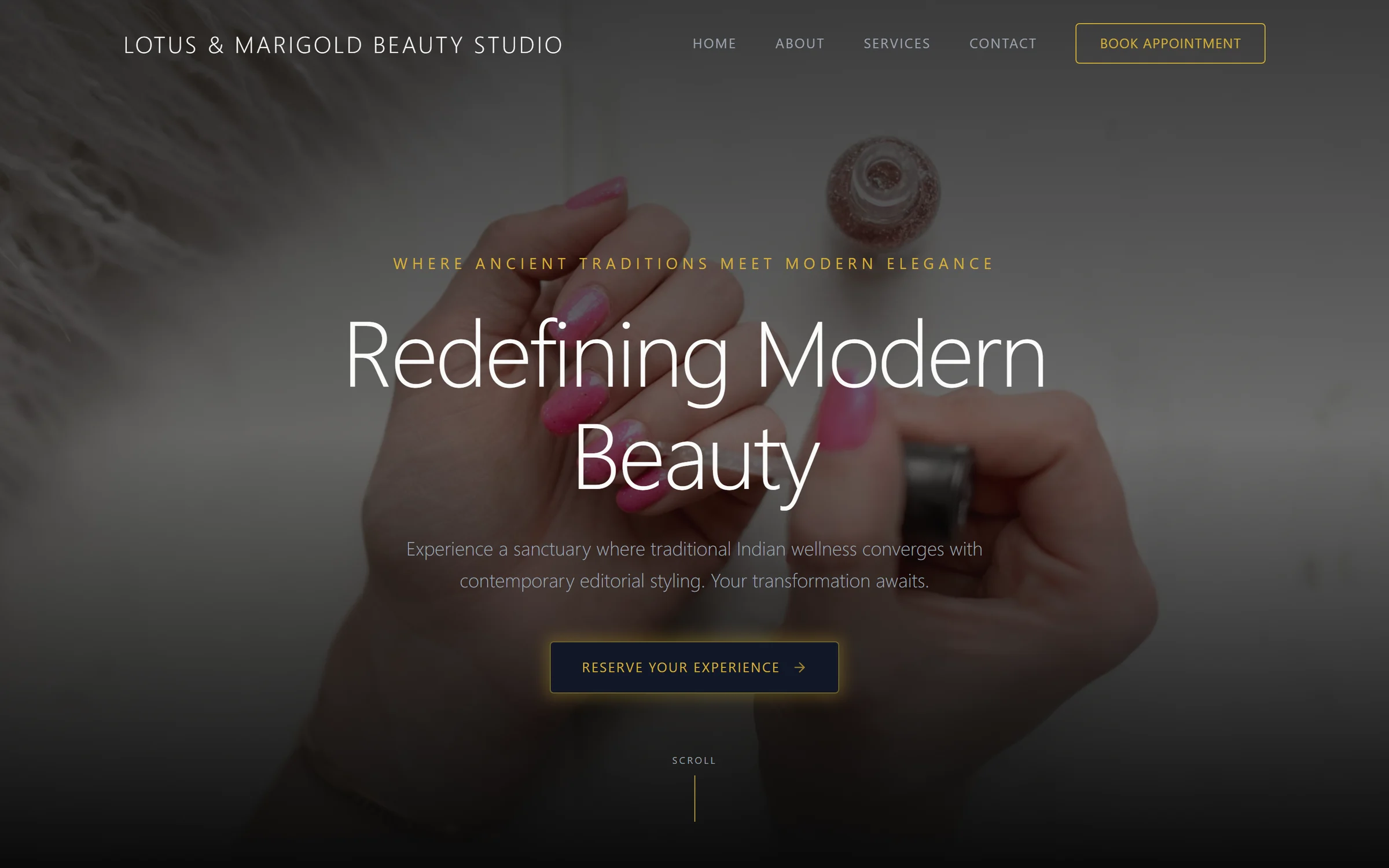
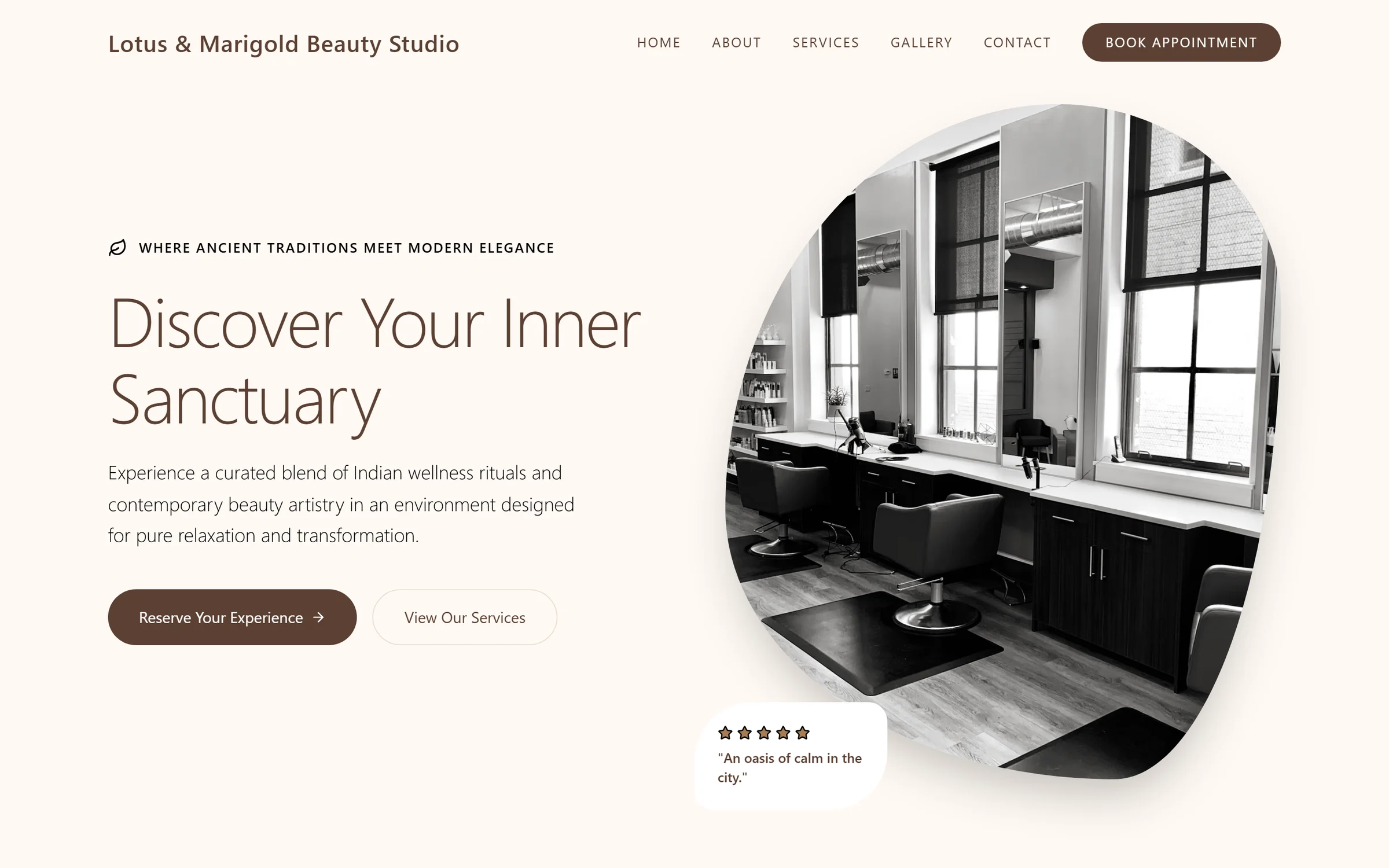
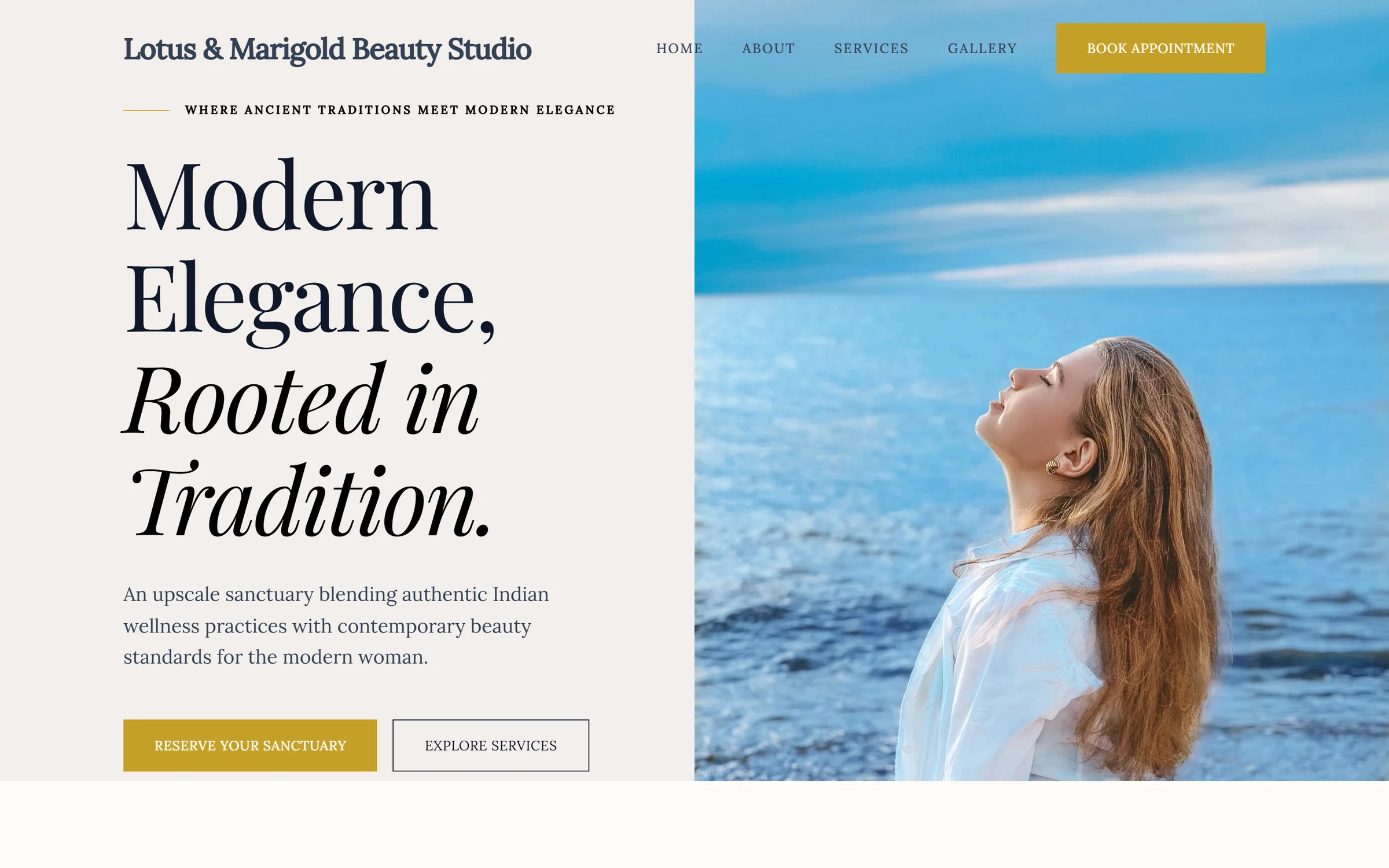
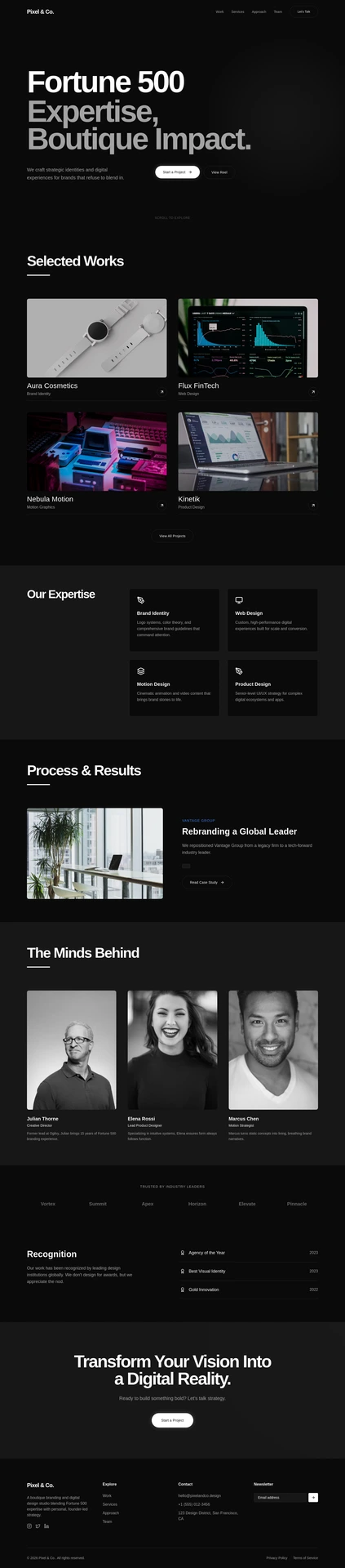
Three complete designs. One brief. Here it is twice.
The top row is three directions from a single beauty-studio brief; the bottom row is three from a design agency’s. Within each row the content plan, the pages and the offer are the same — the composition, typography, colour and rhythm are what changed.


Before you move a project
What agencies ask about this one.
Can I bring a client's existing Webflow site across?
You can start from the address of any live site. Mondovo reads the pages and the content and rebuilds the design on top of them, and you review what it found before any design is generated. The deeper import, where pages and posts come across as structured records, is the WordPress path.
Do the three designs use the same words?
Yes, and that is the point. All three are built from one content plan you approved, so the client is choosing a design rather than choosing between three sets of invented copy.
Can I edit the code, or export it?
You can edit a design's files directly, and every change lands in version history and can be undone. Your content and your published site are yours, and the connector can pull a design's source. What there is not is a packaged export of the site as a project to rebuild elsewhere.
Will the design match a brand guideline?
The generated designs take direction from the brief, and you can refine any of them visually or by describing the change in words. What we will not claim is that a generated design lands a complex identity system first time. Expect to refine, and budget for it.
What can the client change after launch without me?
Text and images, edited on the page. Enquiries arrive in the site's own inbox and become contacts with a timeline, forms are part of the platform with no third-party embed, and version history has page-scoped restore if something goes wrong.
Will the published site carry Mondovo branding?
No. It publishes to your client's domain with no Mondovo branding. Putting your agency's name on the review link and the client-facing screens is part of the $99 a month Agency add-on.
What are the other Webflow alternatives?
Framer if you want a designer’s canvas with fast publishing. WordPress if you need a plugin ecosystem and are happy to maintain it. Duda if your agency wants client accounts and permissions inside the platform. Mondovo if you want complete designs generated from a brief rather than built by hand, with the enquiries and SEO alongside.
Webflow is a trade mark of its owner. It is named here to identify the product being compared. Nothing on this page implies any relationship with or endorsement by Webflow.
The cheapest way to settle it
Put three directions next to your last Webflow build.
The drafts cost nothing, so you can run a real client brief through this and judge the output against work you already know.