
For estate agents, realtors and property firms
A real estate website that keeps listings right and buyers answered.
Listings arrive, change price, go under offer and come off. Here each one is a row you edit, and every page that shows the property changes with it. Around it: a chat that answers at midnight, viewings booked into your diary, every enquiry in one inbox.
- Listings you edit once, shown everywhere
- An "ask about this property" form on each one
- Viewings booked from your real diary
- Calls answered with the Voice Agent add-on

Where the instructions go
Four moments an agency loses a buyer, or the next seller.
None of them is about the website looking nice. Each one is a moment when somebody wanted a property, or wanted you, and could not get an answer.
Somebody asks about a house at eleven on a Sunday night.
The chat on your site answers from your own listings and pages: bedrooms, parking, whether it is still available, when viewings are. It takes their details, and offers a viewing slot when Appointments is on. Or they use the form on that listing, so the message says which house.
Chat and enquiry formsThe phone rings while you are showing a house.
The Voice Agent answers your office number from what your published site says. It offers a real viewing or valuation slot or takes a callback, saves the caller as a contact, and leaves you a transcript and a summary. It is a per-site add-on, on the number you already have.
AI receptionistThe price dropped on Thursday and the old figure is still on the home page.
A property is one row: address, price, bedrooms, photographs, status. Change the price once and the listings page, the property page and the front-page highlights all show the new figure. Mark it under offer, or take it off, the same way.
ListingsA buyer views, likes it, and hears nothing for a week.
Every enquiry, chat, call and viewing lands as one contact with a timeline, so the second request is not a stranger. A follow-up you wrote once can go a few days after the viewing, and nobody has to remember to send it.
Contacts and follow-upsHow listings are held
A property is a row, not a page somebody has to build.
Add a row and the property appears on the listings page, on its own page, and in the highlights on the front page. Remove it and it goes from all of them at once. If you already have a site with listings on it, they can be brought across when you start.
Star the ones you want seen
Mark a property as featured and it moves to the front of the list. That is how the properties on your home page are chosen: by you, not by whichever one was added last.
Sales and lettings, kept apart
Separate lists with their own pages, so a two-bedroom rental does not appear in the middle of the houses for sale.
Photographs where they belong
Each property carries its own set of images, uploaded once and used on every page the property appears on.
A week on one property
None of this needs a developer, and none of it needs a rebuild.
- Monday
New instruction
Add the row, drop in the photographs, and write the description or have a first draft written for you and then fix it.
- Thursday
Price reduced
Change one number. The listings page, the property page and the front page all show the new figure straight away.
- Sunday
Under offer
Change the status. If you would rather it came off the site entirely, remove the row and it is gone from every page that showed it.
Get one of those wrong at half past five on a Friday and the previous version of the site is still there to restore.
One property, start to finish
What happens between a new instruction and a viewing.
Each step is something Mondovo does today. The agency and the house are made up.
- Mon 09:10Listings
Listed
You add 14 Elm Road with its photographs. A first draft of the description is written for you to fix. It appears on the listings page and the front page.
- 09:20Social posts
Posted
A "just listed" post is written from the listing, with your photograph, and goes to Facebook and Instagram when you schedule it.
- Tue 22:40Chat on your site
Answered
A buyer asks the chat on your site whether it has a garden and parking. It answers from the listing, and offers Saturday viewings.
- 22:42Viewings
Booked
They pick Saturday at 10:30 from your negotiator's real availability, with Google Calendar busy times taken into account.
- 22:42Inbox and alerts
You hear about it
It lands in your inbox as one contact, and in your team channel. In Slack, Confirm is one tap.
- FriReminders
Reminded
They get a reminder the day before and an hour before, by text if you add SMS. You get the day's viewings by email in the morning.
- Next weekEmail follow-up
Followed up
A short email you wrote once goes out a few days after the viewing. When the price changes, you change one number and every page shows it.
Illustration using a demo business, Vista Luxury Realty. Not a customer.
Behind the site
The website, and everything an agency runs on it.
One account and one login. Here is what comes with a live site, what is an add-on, and what uses credits.
- Included
- Comes with every live site on Pro.
- Add-on
- A per-site extra you switch on in Billing.
- Credits
- Creative Studio work, priced before it is made.
Get found
Catch the buyer
Keep the client
Win the next instruction
Change it any way you like
Update a listing from the car, the office or a viewing.
No developer and no waiting. Every change is kept, so anything can be put back.
- In the editorClick the text and type. Swap a photograph. Change a price or a status in the property's row.
- By asking in the dashboardSay it in a sentence, like "mark 14 Elm Road as under offer", and it is done.
- Out loudDictate a change, or talk it through, between viewings.
- On WhatsAppMessage Mondovo, send the photographs of a new instruction, and approve the change with a tap.
- Slack, Teams, Discord or Google ChatNew enquiries and viewings posted to the office channel. In Slack, confirm a viewing or ask Mondovo a question.
- Claude or ChatGPTConnect Mondovo to the assistant you already use and say: "Mark 14 Elm Road as under offer and put a post about it on Friday." The post is only sent once you say so.
What is on your real estate site
What a good estate agency website has. Yours starts with all of it.
Drafted from a few sentences about the firm. You read the plan for every page before anything is designed, and change what is wrong.
Use your own photographs of each property. A generated picture of a kitchen the house does not have is a misdescription. Generated images are fine for posts and area pages, never for the listing.
- Every property with photographs, price, bedrooms and status
- Separate lists for sales and lettings
- Featured properties on the home page, chosen by you
- A page for each property, with its own enquiry form
- Viewings booked online from your diary
- A shortlist visitors can save, and a side-by-side compare
- A valuation request for people thinking of selling
- A page for each area you cover
- Your team, each with a photograph and a short line
- Reviews from buyers, sellers and landlords
- A chat that answers when the office is closed
- Questions people ask: fees, chains, referencing, deposits
Six businesses, six briefs
Six property businesses, and none of them sells the same thing.
Lettings, an auction house, a single new-build development, a rural agency, commercial premises and a two-person coastal practice. Each was generated from a description of that business, so the listings and the language belong to it: acreage before bedrooms for the farm, a live availability register for the developer. Every round gives you three complete versions; a site can hold up to ten.
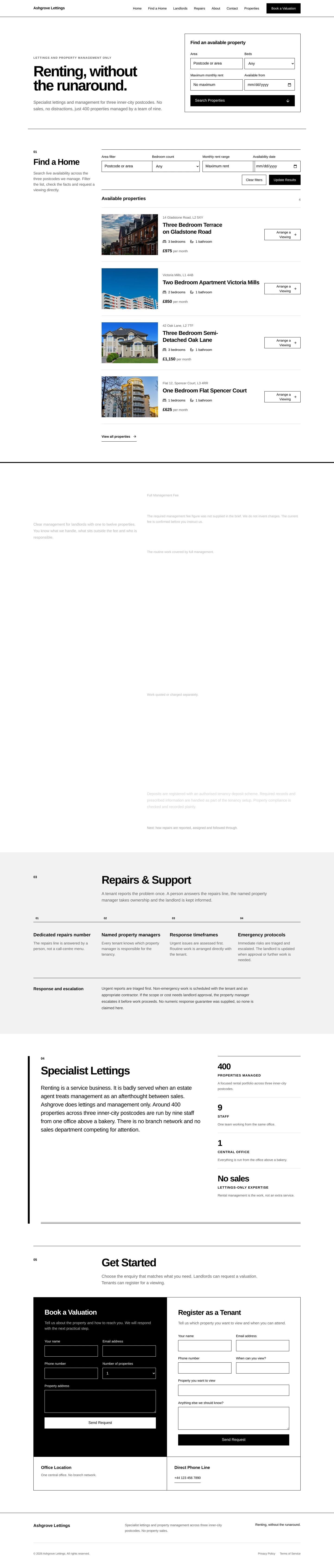
White and precise, tenant search before anything else.
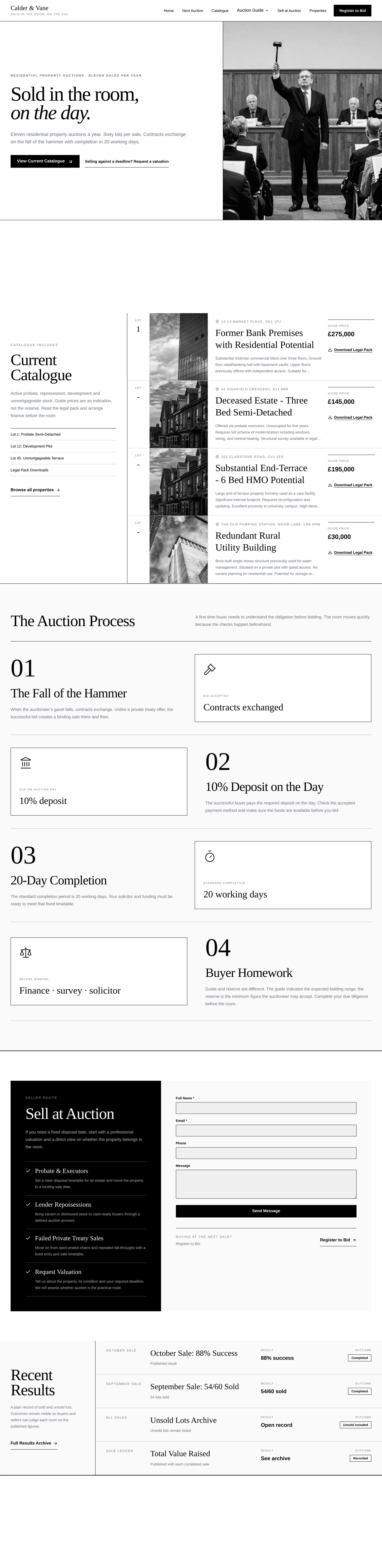
Black and white, a serif headline, a gavel in the room.

Near-black and gold, eleven miles of coastline.

A live availability table: phase, status, units left.
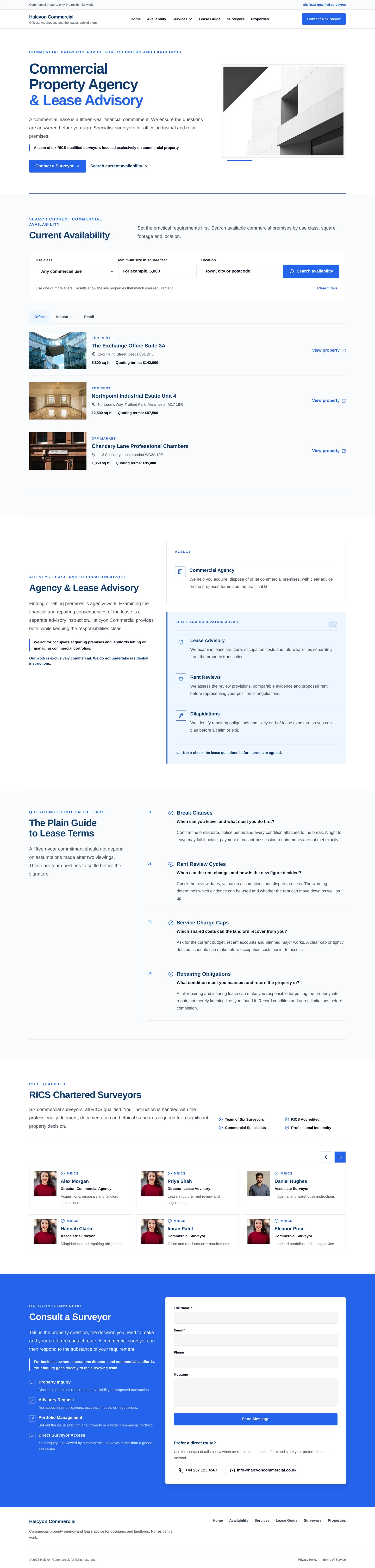
Square feet and use class. No lifestyle language anywhere.
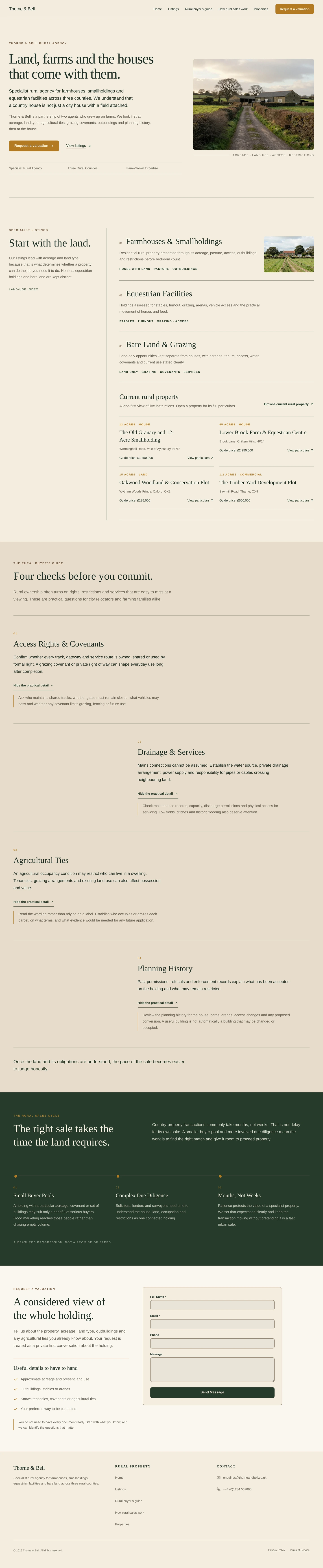
Acreage, land type and access rights before the house.
Real generated sites, shown as demonstrations rather than customers. The businesses and every property on them are invented.
See more in the galleryBeing straight with you
What it does not do.
It does not push to the portals
Nothing syncs out to property portals or an MLS, and there is no built-in connector for a named portal or back-office system. If your listings live in a system with an API or a feed, a list on the site can be filled from it over REST, GraphQL or RSS.
It answers calls, it does not make them
The Voice Agent answers incoming calls and takes callbacks. It does not ring buyers or transfer a live call.
It is not a back office
Progressing offers and sales, managing tenancies and collecting rent stay where they are now. If a back-office system feeds every channel for you, talk to us before you move.
What it costs
Build free. Go live with Pro.
Pro is one price per live site, per month, shown in your currency on the pricing page. A second branch as its own site is priced the same way.
- Building, designs and previews
- Free
- Going live, hosting, SSL
- Pro
- Listings, enquiry forms, viewings, chat, inbox
- Included
- Properties, pages, enquiries
- Not counted
- Voice Agent, text messages
- Per-site add-ons
- Graphics, video, logos
- Credits
Editing the site, by hand, by chat or by voice, never uses credits. Extra team seats are on the pricing page. Your phone provider bills you directly for the number and call minutes.
See pricing for your countryQuestions
Asked before anybody moves a website.
Will it push our listings to the portals?
No. Nothing syncs out to the portals, so your portal listings stay a separate job, exactly as they are now. If your listings already sit in a system with an API or a feed, a list on your site can be filled from it.
How many properties can we list?
There is no counted limit and no charge per property or per page. The price is per live site.
We have a site with a hundred listings already.
Give it the address and the pages and content come across, and you review what it found before any design is generated. Check the listings that came over: they are yours from that point, not a live feed.
Can buyers book a viewing themselves?
Yes, with Appointments switched on. Set each negotiator's hours, connect Google Calendar so busy times are blocked, and buyers pick a slot from the site or the chat. They get reminders, and a link to move the viewing if plans change.
Can it answer the office phone?
Yes, with the Voice Agent add-on. Point your Twilio, Plivo or Exotel number at it and it answers from what your site says, books a viewing or takes a callback, and saves the caller. You can talk to it in your browser before you connect a number.
Can the office update listings, not just me?
Yes. Invite the team and each person gets their own login. Every change is recorded and any version can be restored, so a wrong price on a Friday is a minute's fix.
Your agency
Describe the firm and the patch it covers.
You see what every page is going to say before a design exists. Building and trying designs is free, and nothing is public until you say so.
See how it works, step by step