
Claude and ChatGPT website builder
Build a website in Claude or ChatGPT, and run it from there.
Build and edit your website from Claude or ChatGPT, plan posts, draft emails, make images and read enquiries. Campaign sending, billing and some account settings are handled in the Mondovo app.
The connector works on every plan, including the free one. API access is a separate thing, and it is part of the $99 Agency add-on.
What it actually looks like
One client, from brief to first posts, in a chat window.
Nothing below is a mock-up of a feature we are planning. Each of the steps the assistant takes is a thing the connector does today.
You
Assistant
You
Assistant
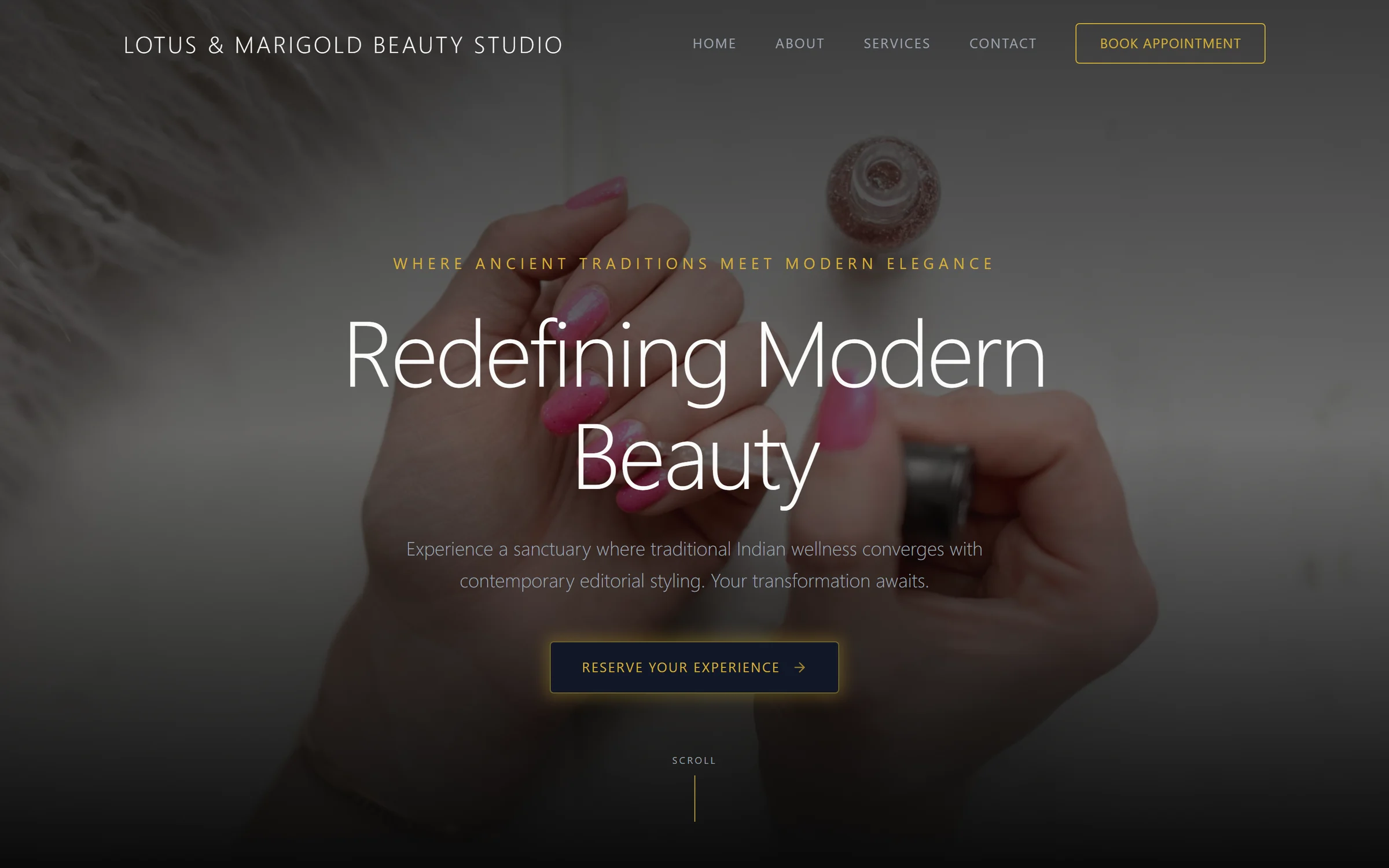
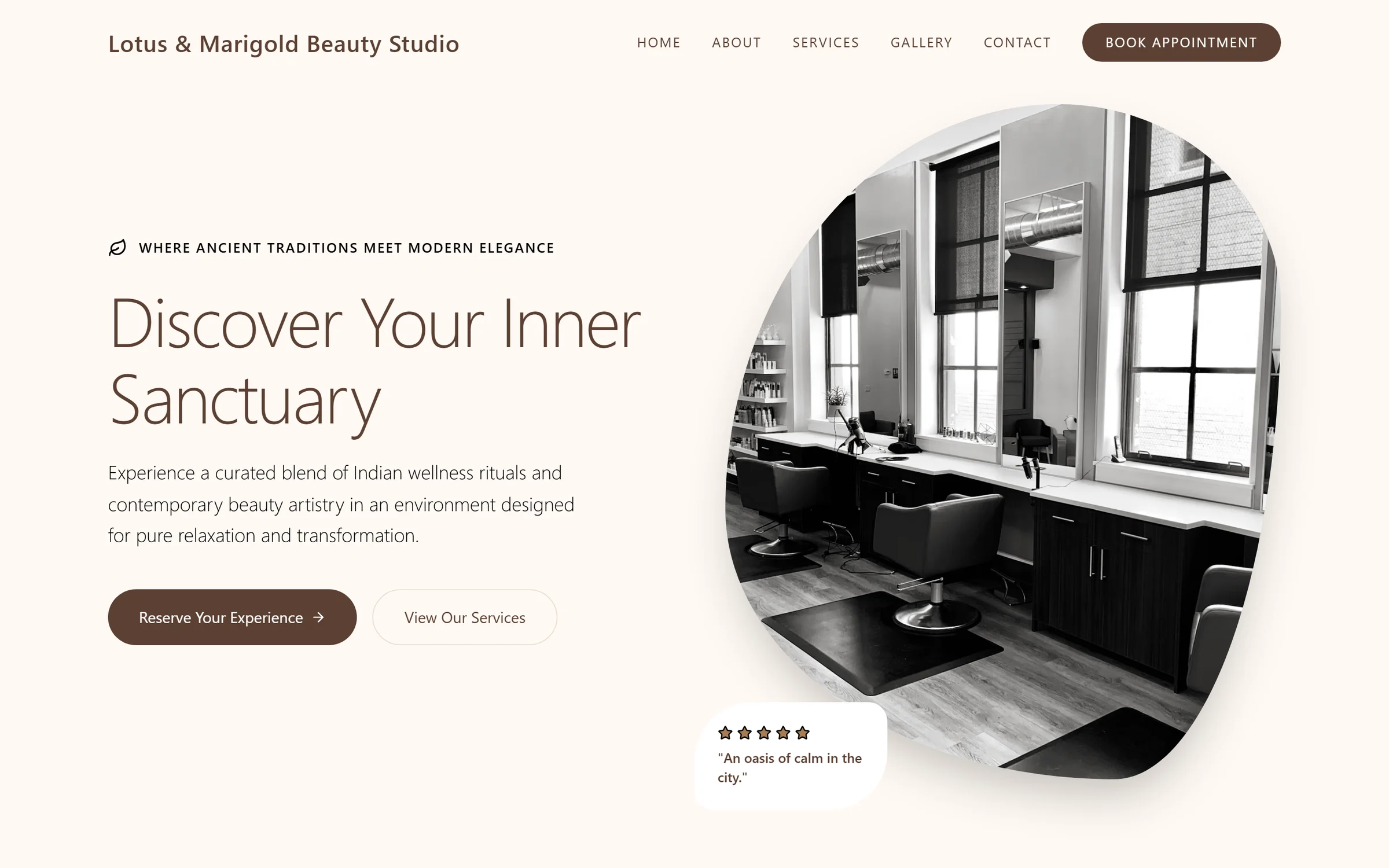
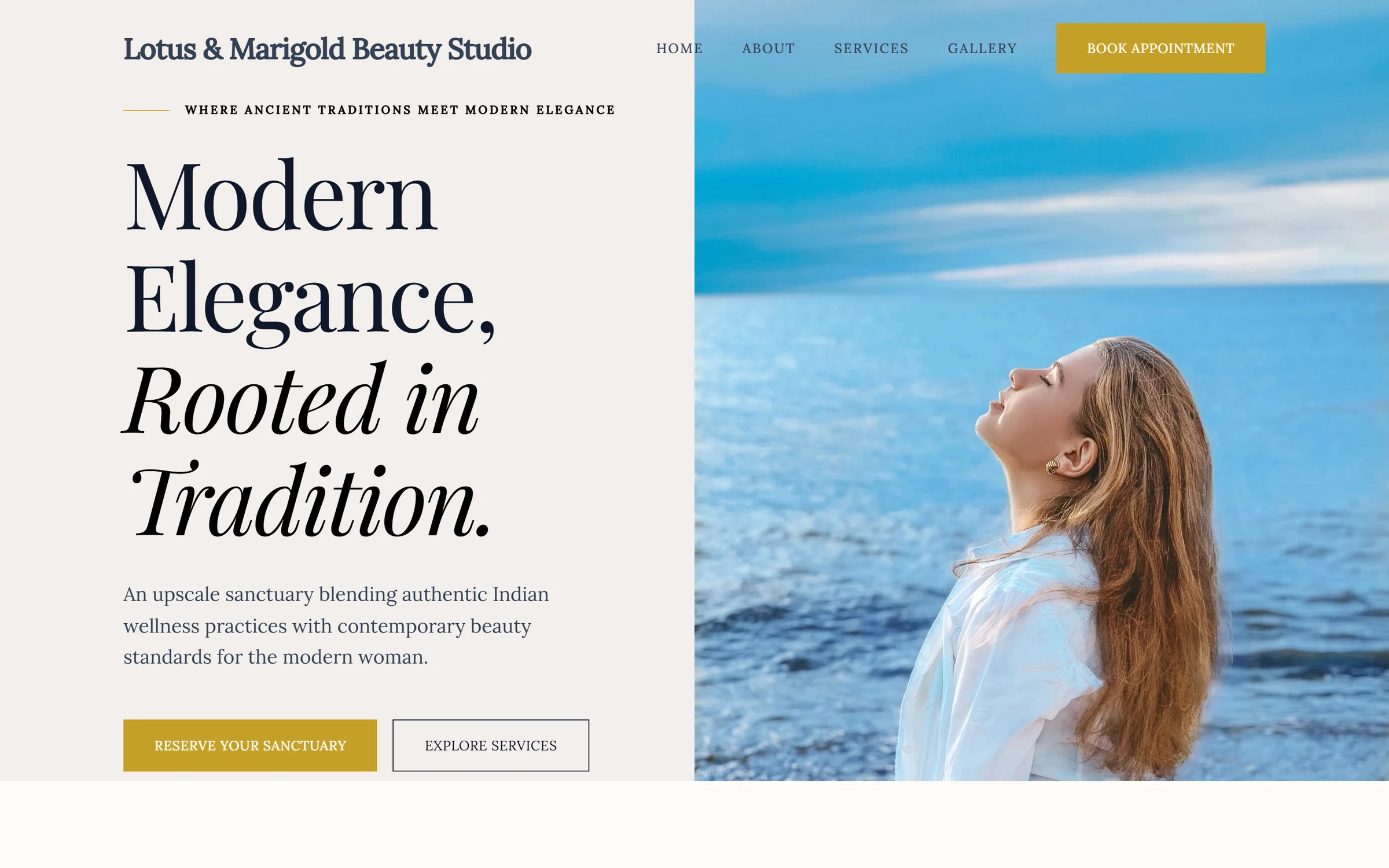
The three designs from that round. Same content plan, three directions.
You
Assistant
You
Assistant
You
Assistant
You
Assistant
Everything the assistant changes lands in version history with the rest of your team’s edits, and can be restored. Nothing goes live until you ask for it, and email campaigns are sent from the app, not from the chat.
What the connector can do
The same jobs as the app, asked for in words.
These are not shortcuts to a lesser version of the product. A site created from a conversation is the same site your team opens in the editor, with the same designs, the same inbox, the same calendar and the same version history.
Create a site from a brief
Paste the scope document, or type three sentences. Mondovo asks the follow-up questions it needs, then writes a page-by-page content plan for you to approve before anything is designed.
Generate and compare designs
Three complete multi-page designs from one approved content plan, up to ten on a site. Ask for another round when none of them is right.
Refine a page by describing it
Change a headline, a section, a colour or a layout by saying what is wrong with it. Every change is recorded and can be undone.
Plan and schedule posts
Write a week of posts, attach images or video, and put them on the calendar. A post is published to a connected account only when it is queued.
Draft emails and follow-ups
Draft a campaign for a list or a segment, or a follow-up sequence. Campaigns are sent from the app, and sequences are saved switched off.
Make images, videos and logos
Plan a piece in Creative Studio, see the price in credits, then make it. Nothing is charged before you agree the quote.
Read and sort the inbox
See new form submissions and contacts, tag people, save a segment or export a list.
Check how things are going
Read the site’s traffic and enquiries, your Meta ad results, and a list of marketing ideas for the business.
Publish when it is approved
Publishing is always something you ask for. Domain, hosting and SSL are handled; nothing is live before you say so.
For studios with their own design system
Bring the layout. Keep the rest of the platform.
If you already design in code, the generated directions are not the reason you are here. Import the layout you wrote as a design on the site and it sits beside the generated ones on the same content plan — same client review link, same inbox, same publishing, same version history.
- It becomes a design, not a replacementThe site keeps every other design it has. Switching the live one is a click, and switching back is another.
- It is checked before it landsThe layout is validated on the way in, so a design that will not build never becomes the live one.
- Your client sees a review link, not a repoThe same comment-on-an-element review works on an imported design as on a generated one.
Be clear about what costs what
The connector is not the API.
The Mondovo connector is available on every plan. API access for your own software is part of the Agency add-on.
The connector
Every planFree and Pro. Nothing to buy.
- Connect Claude, ChatGPT or any assistant that supports MCP connectors
- Build and publish sites, plan posts, draft emails, make creative, read the inbox
- The same limits as the app: drafts are free, a live site is $20 a month, creative uses credits
Agency add-on
$99 a monthFlat, on top of any plan.
- API access, for building Mondovo into your own tools
- White-label: your agency's name on the review link and the client-facing screens
- Outreach: 2,000 prospects, 200 previews and 1,000 emails a month
Nothing else changes when you add it. The add-on does not raise your site limits or your credits — it unlocks white-label, the API and outreach, and that is the whole list.
Getting it running
Three steps, once.
Setup is the boring part and it should be. After this, the connector is just there in your assistant.
Make a free account
You need somewhere for the sites to go. Drafts cost nothing, so you can do the whole first project before deciding anything.
Add Mondovo in your assistant
Open the connectors page, follow it into Claude or ChatGPT, and approve access once. Access to contacts, Creative Studio and the posting calendar is asked for separately, so you choose what the connection may do.
Ask for what you need
That is the whole interface. Ask for the site, the changes, the posts or the email, then to publish.
Before you connect it
The questions people ask first.
Which assistants does this work with?
Mondovo connects to supported MCP clients, including Claude and ChatGPT. Availability depends on the assistant’s current plan, connection settings and workspace permissions. Sign in to Mondovo and review the permissions you grant.
Does it cost extra?
No. The connector is on every plan, including Free, and follows the app’s limits. Free includes one published site on a Mondovo address. Pro supports custom domains; prices and billing terms depend on billing country. Refinements follow plan limits; Creative Studio uses its credit allowance. Builder voice has separate minutes.
Can it publish something without me?
Ask the assistant to publish only when you are ready. Saved website versions can be restored from version history. Restoring a website version does not reverse messages, billing, credit usage or other business actions; review changes and requested actions before proceeding.
Can it post or send email without me?
It cannot send an email campaign; campaigns are sent from the app. Follow-up sequences it drafts are saved switched off. Posts go onto the calendar as drafts and are published only when queued, which the assistant does only if you ask it to.
Can it work on sites my team built in the app?
Yes. It is the same workspace and the same sites. Work started in a conversation can be finished in the editor and the other way round.
We write our own layouts. Is that supported?
Yes. A hand-authored layout can be imported as a new design on a site, next to the generated ones, on the same content plan. It does not replace anything already there.
Is API access the same thing?
No, and the difference matters. Driving Mondovo from an assistant works on any plan. Calling the API from your own code is part of the Agency add-on, along with white-label and outreach; its price and availability are shown in Billing.
Your next job
Ask for it in the window you are already in.
Connect it once, then see how much of the site, the posts and the emails you can get before you open the app at all.