
Website migration
Move your website from Wix, Squarespace, GoDaddy or Webflow without starting over.
Paste your current address. Mondovo reads your pages, text, images, logo and colours, shows you everything it found before anything is designed, and builds three complete designs on your own content. Every old address is redirected to its new page, so customers and Google still find you. Nothing to install, and nothing to pay until you publish.
Free plan available. No credit card required.
How the move works
Five steps, whichever platform you are leaving.
Nothing changes on your current site while you work. It stays live until you point your domain at the new one.
- Step one
Paste your address
Give Mondovo your current site's address. No login to share, no export file to find, and nothing to install.
- Step two
It reads your site
Your pages come across with their text, headings and images, plus your logo and brand colours. Blog posts and products can be imported in bulk from a sitemap address, a WordPress or Shopify store, or a CSV file.
- Step three
You review what it found
Before any design exists, you see the plan of pages and what each will say. Correct details, drop pages you no longer need and add what is missing.
- Step four
Three designs are made on that content
All three carry your own words, so you compare finished pages, not templates. Switching the live design later is a click, not a rebuild.
- Step five
Publish and point your domain
Old addresses are redirected to the closest new pages with permanent (301) redirects, which you can check and edit. Your domain stays registered wherever it is now.
The review step decides whether a move goes well. It is where you find what did not come across, before anyone else does.
Read this before you move
What comes across, and what does not.
Anything a visitor can see on your public pages can come across. What a platform was doing behind the scenes is set up fresh.
Comes across
- Your pages, with their structure, text and headings
- Images, copied to our storage, plus your logo and brand colours
- Blog posts and products, imported in bulk from a sitemap, a store address or a CSV file
- Your old page addresses, each redirected to the closest new page
Does not come across
- The old design itself. You choose a new one from three, which is usually the point of moving
- Apps and integrations from your old platform. Bookings, forms, a store, a customer area and email exist here, but are set up fresh
- Content behind a login, such as member pages and gated downloads
- Order history, customer accounts and passwords
- Email lists stored inside the old platform. Export them before you cancel and import them as contacts
Work out what your site depends on before you set a date. A brochure site is a short job. A site whose value is in an app or integration needs that rebuilt, and should be planned as such.
Platform by platform
What your current platform lets you take with you.
The second column quotes each platform's own help pages, read on 28 October 2026. It is why reading your live pages is usually faster than working from an export.
Platforms change their export tools. Check the linked help pages before you plan around them.
| Moving to Mondovo | What the platform exports | |
|---|---|---|
| Wix | Your live pages and posts are read from their addresses, so nothing depends on an export. | Sites must be "hosted and operated on Wix's servers". Store products and CMS collections export to CSV. "Currently, it is not possible to export blog posts to other platforms." |
| Squarespace | Pages the export leaves out, such as portfolio and index pages, are read as content from the live site. | A WordPress .xml file of layout pages, one blog with its posts, and text and image blocks. Store pages, products, styles and custom CSS are not included. |
| GoDaddy Website Builder | Read from the live address. Store products can be imported from GoDaddy's CSV. | Store products export "as a .csv file". We could not find a GoDaddy help article for exporting a whole site. |
| Webflow | Read from the live address, with CMS items importable from CSV. | Webflow documents a code export and CSV exports of CMS collections; check its help centre for which plans include them. |
| Carrd | Your page is read and planned into a full multi-page site. | Pro Plus downloads "the unminified HTML, CSS, and JS source code"; forms are not functional in the download. |
| WordPress | Pages and posts are read from the live site, with a dedicated WordPress import for posts. | A WXR export file of posts, pages, comments, custom fields, categories, tags and users. See the WordPress migration guide. |
| Any other site | Paste the address. If it has a sitemap, posts and pages can be imported from it in bulk. | — |
A dash means there is no single platform to quote. The WordPress row comes from WordPress.org's Tools Export documentation.
What it costs
The move is free. The live site is $20 a month.
There is no migration fee and no per-page charge.
The move itself
Free
Reading your site, the review step and the three generated designs all happen on a draft. Nothing appears on a bill until you publish. If the result is not good enough, you have spent nothing.
Once it is live
$20 per live site per month
Your own domain, hosting and SSL included. Pages, visitors and form submissions are not billed. Each extra live site is another $20. Unpublishing is not destructive, your domain stays yours, and the published site can be downloaded as ready-to-host files.
Compare it with what you pay now at renewal, not at the introductory rate.
Real output
What a site looks like on the other side.
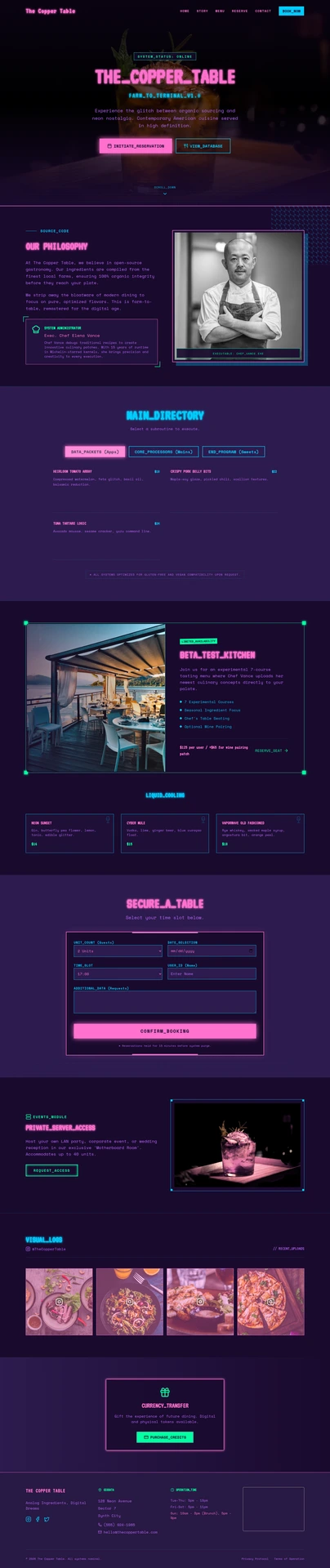
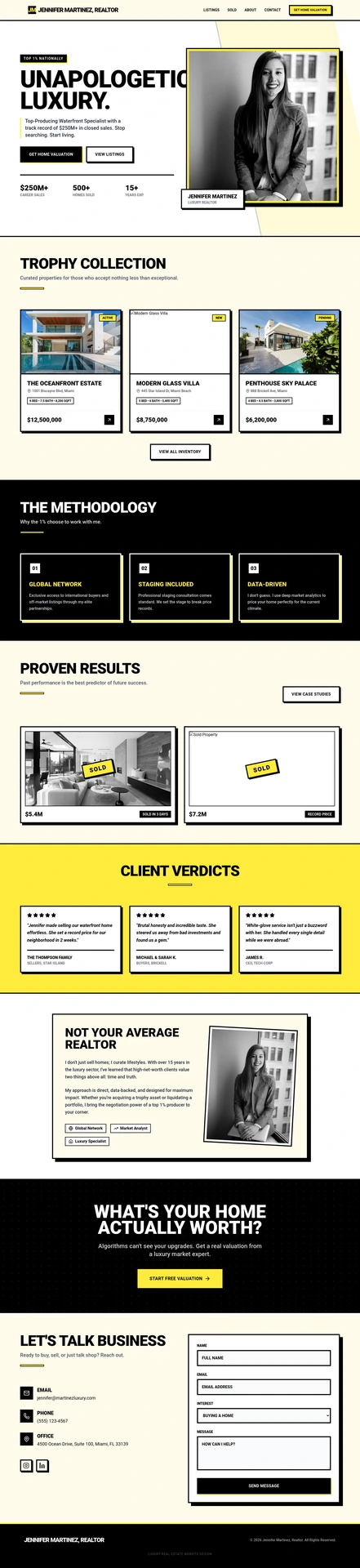
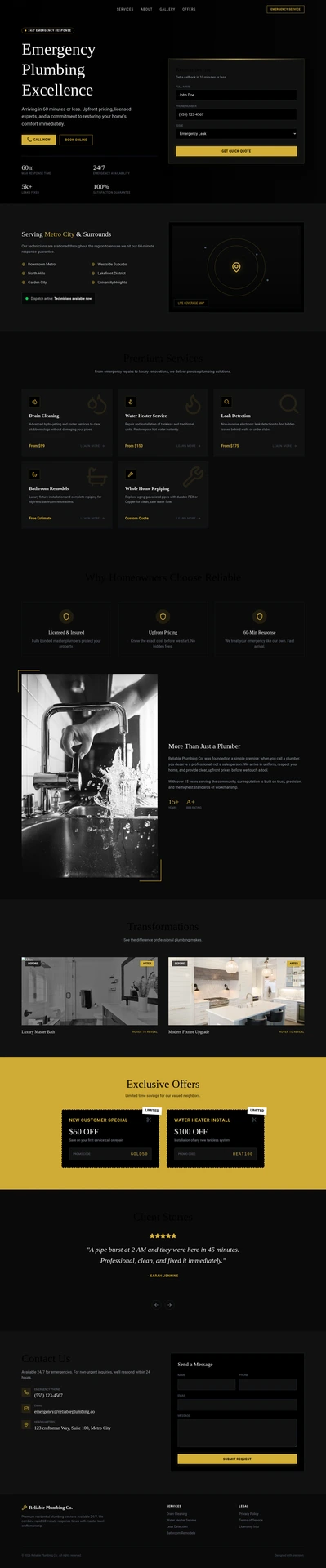
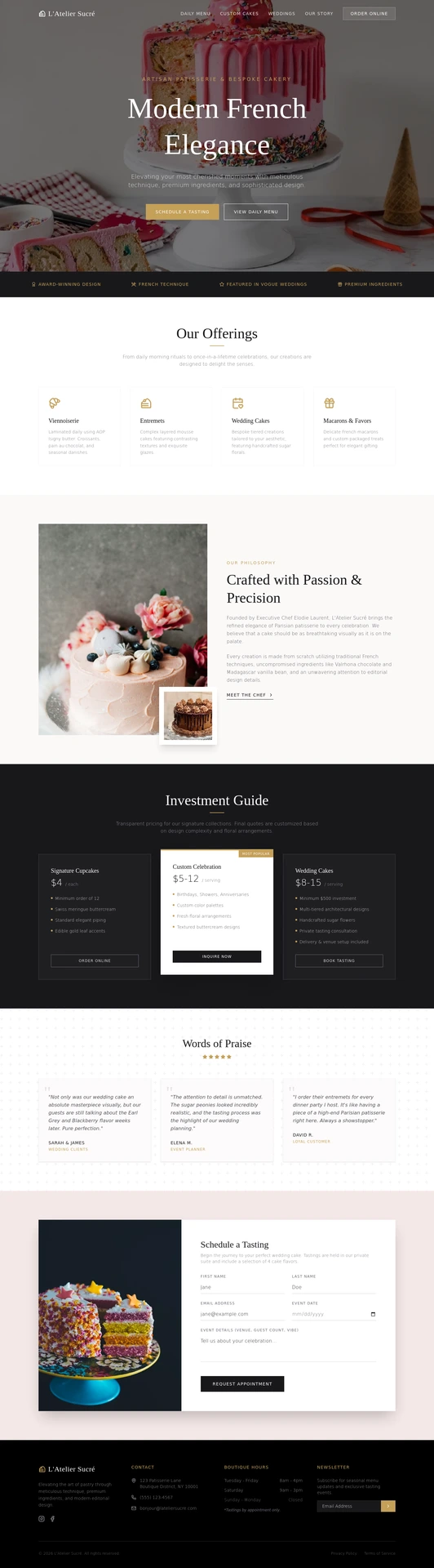
Six businesses, each generated from its own brief. All of them are demonstrations, not customers.


Before you move
Questions about moving your website.
Which platforms can I move from?
Any site with a public address: Wix, Squarespace, GoDaddy, Webflow, Weebly, Carrd, Framer, WordPress, Shopify or a hand-built site. Mondovo reads the live pages rather than relying on the old platform's export tools.
Will I lose my Google rankings?
Every old address is redirected to the closest new page with a permanent (301) redirect, including old .php and .html addresses, and tracking tags in old links carry over. Rows that did not match exactly are marked for you to check before you publish.
How much does a website migration cost?
The move is free. Importing, reviewing and generating designs all happen on a free draft. A live site on your own domain is $20 a month, with hosting and SSL included.
Do I have to transfer my domain?
No. Your domain stays registered wherever it is now, and you point it at your Mondovo site through its DNS settings. Connect it only when the new site is ready.
Can my old site stay up while I build?
Yes. Nothing you do here touches it, and the new site isn't live until you publish and point your domain at it. Cancel the old plan only after you have checked the new site.
What happens to my blog posts?
Posts can be imported in bulk into the blog from a sitemap address, WordPress, or a single page address, with their images copied across. On Wix, which does not export blog posts, this is usually the fastest route.
Can I move an online store?
Products can be imported from a Shopify store address or a CSV file, such as the ones Wix and GoDaddy export. Order history and customer accounts do not come across. Moving a busy store to improve the look is rarely worth it.
How long does it take?
Reading the site and generating designs takes minutes for a typical small-business site. The time that varies is your review and setting up anything your old platform's apps were doing.
Can I leave Mondovo later?
Yes. The published site downloads as ready-to-host files, your domain stays yours, and your contacts and submissions can be exported. Forms, bookings and checkout only work while the site stays with Mondovo.
Platform guides
- Migrate from WordPressWhat comes across, what doesn't, and how plugins affect the move.
- How to move a website off GoDaddyWhat you can take with you, and the steps.
- The best Wix alternatives, and how to move off WixNine builders compared, plus a move checklist.
- The best Squarespace alternativesWhat Squarespace's export leaves out, and where to go instead.
- Keep old links working after a moveHow redirects are mapped, checked and edited.
- Import posts and productsFrom WordPress, a sitemap, a single page, Shopify or CSV.
Wix, Squarespace, GoDaddy, Webflow, Carrd and WordPress are trade marks of their owners. They are named here to identify the platforms being migrated from. Nothing on this page implies any relationship with or endorsement by them.
The cheapest way to find out
Paste your address and see what comes back.
The draft costs nothing, so you can see exactly what came across, and what did not, before you change anything on your live site.