
For photographers
A photography website that shows the work and books the date.
For wedding, portrait, product and event photographers. Your best shoots up front, enquiry forms that ask for the date and the venue, and portrait sessions booked into your calendar. Then the review and the next post, without the evening on admin.
- A portfolio page for every shoot
- Enquiry forms that ask for the date and venue
- Portrait and mini sessions booked online
- Packages and starting prices, if you publish them
Where the bookings go
Five ways a photographer loses clients who already liked the pictures.
Nobody books a photographer because the website is tidy. They book because they saw work they loved and it was easy to ask. Each of these is a moment when that went wrong.
Your best work is buried somewhere in an Instagram grid.
Each shoot gets its own portfolio page: the cover picture, the photos, the kind of shoot (wedding, portrait, product, event), the place and a few lines of story. Star the shoots you are proudest of and they lead the home page. Visitors open any picture full screen. Your own Instagram posts can sit in a section of the site too.
Portfolio pages"Are you free on the 14th?" arrives with no venue, no hours and no budget.
Your enquiry form asks what you need before you reply: the date from a date picker, the venue, the hours of coverage, the kind of shoot, the budget. Product clients can attach a shot list. Every enquiry lands in one inbox as a contact you move from new to quoted to booked.
Enquiry forms and inboxMini-session day fills up through forty direct messages.
Put portrait and mini sessions on the site with their length, your hours and Google Calendar busy times. People pick a real slot, pay a deposit through your own payment account if you ask for one, and get a reminder before they arrive. They can move the session themselves from a link.
BookingsCouples want to know the price before they want to know you.
A packages page sets out what each one includes: hours, edited images, a second shooter, turnaround, with a starting price if you choose to show one. A short email series after an enquiry can send the packages and a few recent weddings. Follow-ups are saved switched off until you read them.
Packages and follow-upsThe shoot went beautifully. The review never came.
When a session booked on your site is marked complete, the client can be asked for a Google review, and replies are drafted for new reviews. A post built from the shoot is written for Instagram and Facebook and goes out when you schedule it.
Reviews and social postsOne client, start to finish
What happens when a newly engaged couple goes looking on a Sunday night.
Each step is something Mondovo does today. The studio and the couple are made up.
- Sun 21:40Portfolio page
Found
They search for a wedding photographer in their city and land on your portfolio page for a Hill Country wedding.
- 21:46Enquiry form
Enquiry sent
Your form asks for the wedding date, the venue, the guest count and the hours they want covered.
- 21:46Inbox and alerts
You hear about it
It lands in your inbox as a contact, and in your team channel if you want it there.
- 21:47Email follow-up
Packages sent
A thank-you email with your packages goes out from your own domain, because you read it and switched it on.
- Thu 18:00Bookings
Call booked
They pick a time for a consultation call from your real availability, and get a reminder an hour before.
- OctoberDeposit
Engagement shoot
They book the engagement session on the site and pay the deposit through your payment account.
- The day afterReview request
Asked for a review
You mark the session complete and a link to your Google review page goes to the couple.
- That weekSocial posts
Posted
Your favourite frames become a post for Instagram and Facebook, written for you. It goes out when you schedule it.
Illustration using a demo business, Juniper & Vow. Not a customer.
Behind the site
The portfolio, and everything a photography business runs on it.
One account and one login. Here is what comes with a live site, what is an add-on, and what uses credits.
- Included
- Comes with every live site on Pro.
- Add-on
- A per-site extra you switch on in Billing.
- Credits
- Creative Studio work, priced before it is made.
Get found
Catch the booking
Keep the client
Stay booked
Change it any way you like
Swap the portfolio between shoots, from wherever you are.
No developer and no waiting. Every change is kept, so anything can be put back.
- In the editorClick the text and type. Swap a photo. Add a portfolio page for last weekend's wedding.
- By asking in the dashboardSay it in a sentence, like "put the autumn mini sessions at the top of the home page", and it is done.
- Out loudDictate a change, or talk it through, on the drive home from a venue.
- On WhatsAppMessage Mondovo, send the photos you want on the site, and approve the change with a tap.
- Slack, Teams, Discord or Google ChatNew enquiries and bookings posted to your studio's channel. In Slack, confirm a booking or ask Mondovo a question.
- Claude or ChatGPTConnect Mondovo to the assistant you already use and ask for the page, the post or the email.
What is on your photography site
What a good photography website has. Yours starts with all of it.
Drafted from a few sentences about how you work. You read the plan for every page before anything is designed, then put your own photos in place of the sample ones.
A photographer's site should show only photographs you took. Generated pictures are fine for a post or a placeholder while you choose, never as your portfolio.
- Your best work on the home page, chosen by you
- A portfolio page for each shoot, with the place and the story
- A page for each kind of work: weddings, portraits, products or events
- An About page with your face on it
- Packages, with starting prices if you publish them
- What each package includes: hours, edited images, turnaround
- An enquiry form that asks for the date and the venue
- Online booking for portrait and mini sessions
- Kind words from past clients
- The places you work and travel to
- A chat that answers while you are on a shoot
- Questions clients ask: second shooters, travel, how the photos arrive
Two looks
Real photography sites, each built from a few sentences.
Each round gives you three complete versions from one content plan. Same pages and words; only the look changes. A site can hold up to ten, and you choose which one is live.
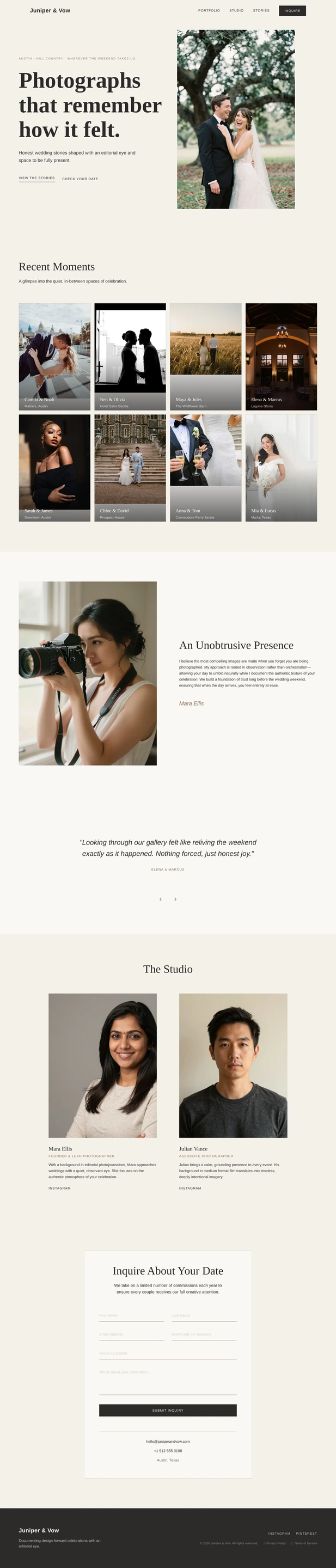
A serif headline, cream paper, the couple beside it.
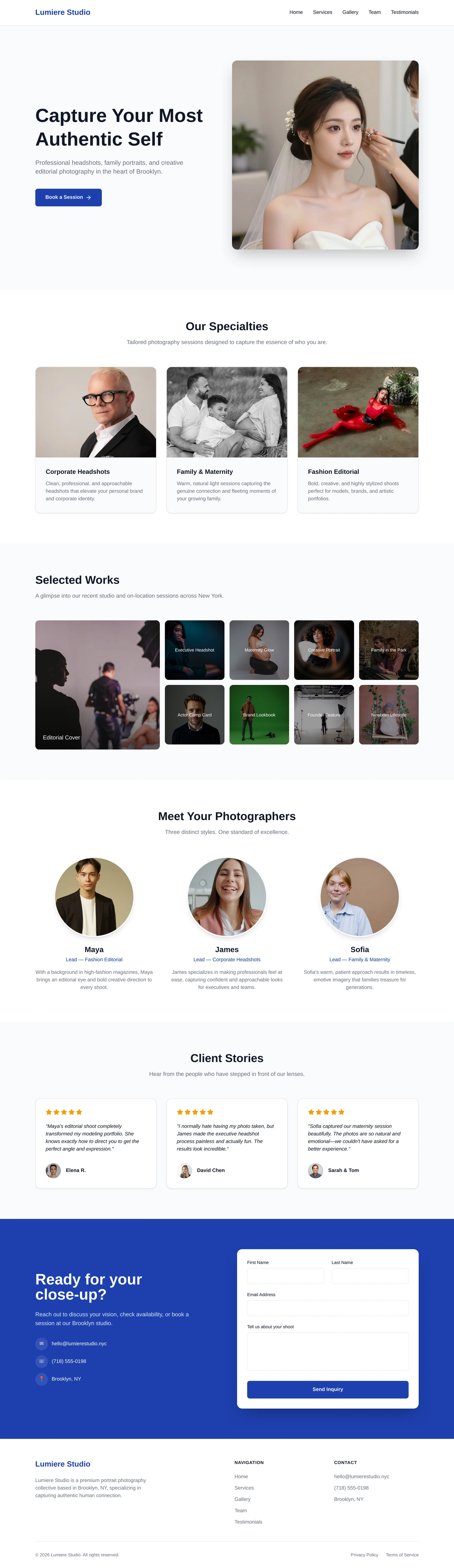
White space, a portrait up front, a booking button in blue.
Real generated sites for two invented photography studios, one for weddings and one for portraits, shown as demonstrations rather than customers. The studios, the people and everything written on them are invented.
See more in the galleryBeing straight with you
What it does not do.
It is not a client gallery
No private or password-protected galleries, proofing, favourites or full-set downloads for your clients. Keep the service you use to deliver a finished shoot.
It does not edit your photos
Culling, editing and retouching stay in your editing software. You put the finished pictures on the site.
It does not hold wedding dates
Sessions book from your availability, but a wedding date arrives as an enquiry and you confirm it. Contracts and invoices stay where they are now.
What it costs
Build free. Go live with Pro.
Pro is one price per live site, per month, shown in your currency on the pricing page.
- Building, designs and previews
- Free
- Going live, hosting, SSL
- Pro
- Portfolio, bookings, forms, inbox
- Included
- Pages, photos, visitors, enquiries
- Not counted
- Voice Agent, text messages
- Per-site add-ons
- Logos, graphics, video
- Credits
Editing the site, by hand, by chat or by voice, never uses credits. Deposits and shop sales go through your own payment account, which charges its own fees.
See pricing for your countryQuestions
Asked between shoots.
How do my own photos get onto the site?
Upload them in the editor and swap them in, or send them to Mondovo on WhatsApp. Each shoot can become its own portfolio page with its photos, the kind of shoot and the place, and you choose which shoots lead the home page.
Can clients book a session online?
Yes. Set up your sessions with their length, your hours and Google Calendar busy times. Clients pick a real slot, can pay a deposit through your own Stripe, Razorpay or PayPal account, get a reminder, and can reschedule from a link.
Do I have to show my prices?
No. A packages page can show starting prices, or describe what is included and ask people to enquire. Either way you can change it whenever your prices do.
Can I deliver galleries to my clients?
No. Mondovo is your public site, not a client gallery: there are no private galleries, proofing or full-set downloads. Keep your gallery service for delivery and link to it if you like.
Will people find me?
Every page has its own title and description, publishing adds a sitemap and structured data, and a page for each kind of shoot and each place you work gives search something to match. Rankings depend on many things and are not guaranteed.
I already have a site.
Give it the address. The pages and words come across, and the design is rebuilt around them. You see what it found before anything is generated.
Your studio
Say what you shoot and where you work.
Building and trying designs is free, and nothing is public until you say so.
Running a different kind of business too? See small businesses