
For barbers
A barbershop website that keeps every chair busy.
Your regulars come back every few weeks and new faces find you through a fade on Instagram. Mondovo builds the site they land on, then runs the bookings, reminders and review asks behind it.
- Booking by barber, from the chairs that are free
- Reminders by email, and by text with SMS
- A deposit at booking, if you want one
- A review ask after every cut
Where the chair goes empty
Four ways a barbershop loses a cut it should have had.
You are holding clippers for most of the day. These are the moments that slip past while you are.
Somebody wants a fade before Saturday and cannot tell if you have room.
Clients pick a cut, a barber and a time on your site from real availability, chair by chair. Nothing to download: it is a page on your site. The chat on the site can find a free slot and book it for them too.
Online bookingYour phone buzzes on the counter mid-line-up.
With the Voice Agent add-on, calls to your shop number are answered from what your site says: prices, hours, whether you take walk-ins. It offers a free slot or takes a callback and saves the caller. It works on your own Twilio, Plivo or Exotel number.
AI receptionistTwo no-shows on a Friday afternoon.
Each booking gets a reminder the day before and an hour before, by email, and by text if you add SMS. Clients can move their own slot from a link, so the gap shows up early. Ask for a deposit at booking, paid into your own Stripe, Razorpay or PayPal account.
Reminders and depositsRegulars drift to the shop round the corner.
Every client has one record with their past cuts and notes. A follow-up email a few weeks after their last visit says they are due, and a review ask goes out once you mark the cut done. Follow-ups are saved switched off until you have read them.
Follow-ups and reviewsOne cut, start to finish
From a fade on Instagram to a regular on a three-week rhythm.
Every step is something Mondovo does today. The shop and the client are made up.
- Thu 19:20Social posts
Seen
A reel of a skin fade, cut from clips you filmed and scheduled from Mondovo, links to your price list.
- 19:22Chat on your site
Answered
The chat on your site says a skin fade with a beard trim takes about forty-five minutes, and who does beards.
- 19:24Bookings
Booked
Saturday at 10:30 with Dee, picked from the chairs that are actually free. A deposit is taken if you set one.
- 19:24Inbox and alerts
You hear about it
A new contact in your inbox, and a note in your team chat if the shop uses Slack, Teams, Discord or Google Chat.
- Fri 10:30Reminders
Reminded
A reminder a day ahead and another an hour before the cut, with a link to move it.
- Sat 11:20Review request
Asked for a review
Dee marks the cut done. A link to your Google reviews follows.
- 3 weeks onFollow-ups
Back in the chair
A "due a fresh one?" email arrives, from a follow-up you switched on. He books the same barber.
Illustration using a demo barbershop. Not a customer.
Behind the site
The website, and everything a barbershop runs through it.
One login for the site, the diary, the client list and the posts. Each card says how it is charged.
- Included
- Part of every live site on Pro.
- Add-on
- An extra for one site, switched on in Billing.
- Credits
- Creative Studio work, with the price shown first.
Get found
Fill the chairs
Keep the regulars
Show the cuts
Change it any way you like
Change the price list between two cuts.
No web designer to chase. Every version is kept, so a wrong edit is one click from undone.
- In the editorClick the price of a skin fade and type the new one. Swap the photo, add a barber.
- By asking in the dashboard"Add a beard sculpt at the bottom of the menu and close us on bank holidays", and it is done.
- Out loudDictate the change with clippers still in hand, or talk it through.
- On WhatsAppMessage Mondovo a photo of today's best cut and approve the change with a tap.
- Slack, Teams, Discord or Google ChatNew bookings and messages posted where the team already talks. In Slack, confirm a booking in one click.
- Claude or ChatGPTConnect Mondovo to the assistant you already use and ask it for the price change, the post or the email.
What is on your barbershop site
What a good barber website has. Yours starts with all of it.
Drafted from a few sentences about the shop. You read the plan for every page before anything is designed.
Use photos of your own cuts. A generated fade nobody in the shop gave is a promise the next client will hold you to; keep generated images for gaps while your own gallery grows.
- A Book a chair button on every page
- A price list: fades, scissor cuts, beard trims, hot towel shaves, kids' cuts
- Your barbers, each with their own book button and the cuts they do best
- Walk-in hours and booking hours, said plainly
- Opening hours, address, parking and the nearest stop
- A gallery of your own cuts
- Your Instagram feed on the page
- Reviews from your clients
- Your deposit, lateness and cancellation rules
- Products, if you sell them: pomade, beard oil, combs
- A chat that answers when the shop is shut
- Answers to first-visit questions: how long a fade takes, cash or card
Two shops, two looks
Two barbershops, each drafted from a few sentences.
Neither shares a template with the other. Your shop gets three complete versions from one approved content plan, and another round if none is right. A site can hold up to ten.
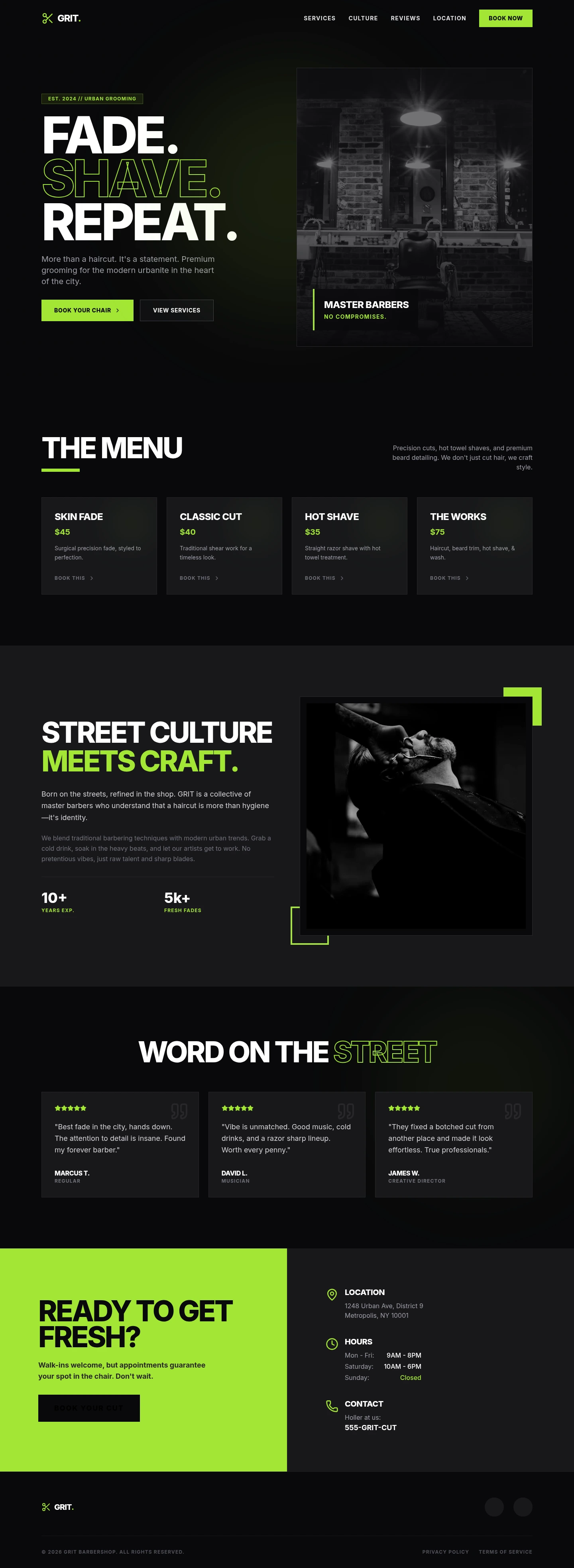
Black and lime, a three-word headline, the menu up top.
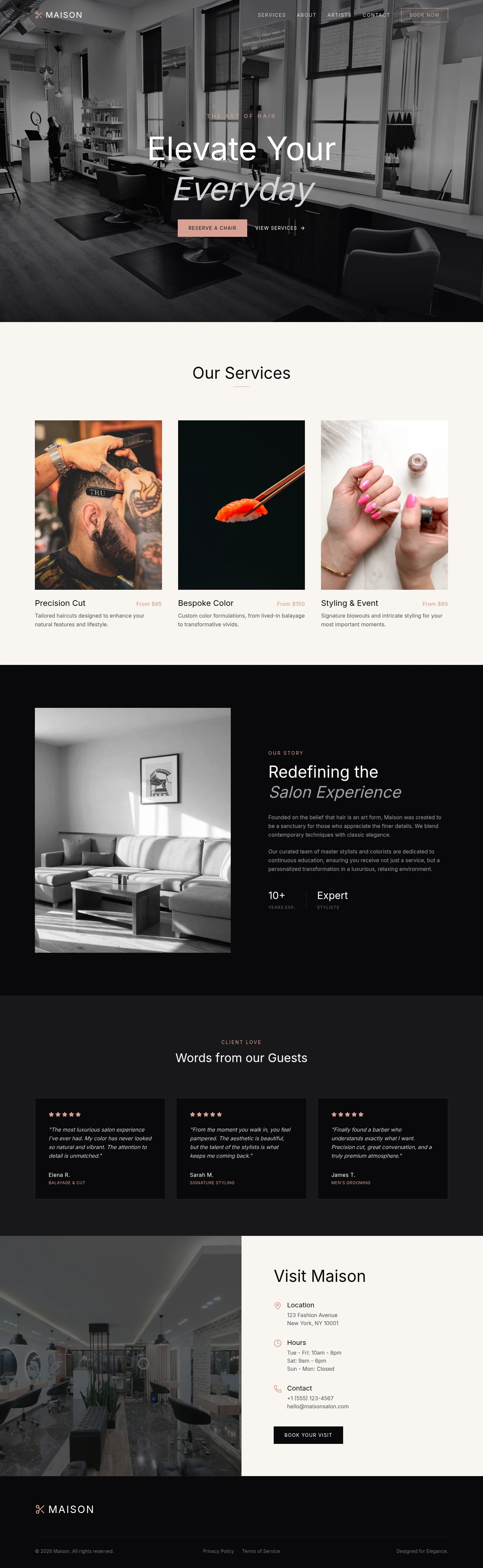
The shop floor in black and white, a serif line, a reserve-a-chair button.
Real generated sites, shown as demonstrations rather than customers. The shops and everything written on them are invented.
See more in the galleryBeing straight with you
What it leaves to you.
No walk-in queue board
There is no live queue or wait-time screen. Walk-ins stay walk-ins; log one on the client's record if you want them on your list.
Calls in, never calls out
The Voice Agent picks up incoming calls and takes callbacks. It will not phone clients or put a caller through to you live.
It is not your card machine
Deposits and online sales go to your own payment account. Paying at the chair stays as it is today.
What it costs
Build it for nothing. Pay when it goes live.
Going live needs Pro: one price per live site, per month, in your currency on the pricing page.
- Building, trying designs, previews
- Free
- Live on your domain, hosting, SSL
- Pro
- Bookings, chat, forms, client list
- Included
- Pages, visits, bookings
- Not counted
- Voice Agent, text messages
- Per-site add-ons
- Reels, graphics, a logo
- Credits
Changing the site by hand, by chat or out loud never uses credits. Card fees go to your payment provider, and the phone provider bills the number and call minutes.
See pricing for your countryQuestions
Asked from the chair.
We are mostly walk-ins. Do I need online booking?
No. Show your walk-in hours and leave booking off, or take bookings for some barbers or some hours only. Many shops do both: walk-ins on weekdays, bookings on Saturdays.
Do my clients need to download an app?
No. They book on your website from their phone, pick the barber and the time, and get reminders by email, or by text with the SMS add-on.
Can I stop no-shows?
Reminders a day and an hour before, a link to move the slot, and a deposit at booking if you switch one on. Deposits are paid into your own Stripe, Razorpay or PayPal account.
Can it answer the shop phone?
Yes, with the Voice Agent add-on. Connect your Twilio, Plivo or Exotel number and it answers from your site, offers free slots or takes a callback, and saves the caller. Try it in your browser first.
All my best cuts are on Instagram.
Upload the ones you want for the gallery and the price list, and show your Instagram feed on the page as well.
I already have a site or a booking app.
Give us the site's address and the pages and words come across into a new design. If you like your booking app, the Book buttons can send people there instead.
Your shop
Tell it about the shop and see three designs.
Building and comparing designs costs nothing, and nothing is public until you choose to go live.
Colour and treatments too? See the salon and spa page