
For gyms, fitness and yoga studios
A gym website that turns a trial class into a member.
People look you up, check the timetable and decide whether to try a class. Mondovo builds the fitness website they land on, then runs the class bookings, packs, memberships and follow-ups behind it.
- A weekly timetable people book from
- Spots per class, with a waitlist when it fills
- Class packs and monthly memberships
- A free first class or an intro pack

Where members slip away
Five places a gym loses people who meant to join.
Most of them never say no. They just don't get an answer, a spot or a nudge at the moment they were ready.
Someone wants to try a spin class but your timetable is a photo of a whiteboard.
Each class gets its weekly sessions, an instructor, a length and a number of spots. Visitors pick a session on your site and book it from what is really free. Nothing to download: it is a page on your site.
Class timetable and bookingThe six o'clock class is full and the people who wanted it go elsewhere.
When a session fills, visitors join its waitlist. If someone cancels, the first person waiting gets an email with a link to claim the place, held for them for two hours.
WaitlistsA visitor likes the place but there is no easy first step.
Offer a free first class, or an intro pack of a few classes at a price you set. Packs and memberships are bought on your site and paid into your own payment account; members sign in to book with them.
Trial classes, packs and membershipsQuestions about parking, showers and beginners arrive at night.
The chat on your site answers from your own pages, finds a session with space and books it. With the Voice Agent add-on, calls to the front desk number get the same answers.
Chat and AI receptionistTrial members come once and never hear from you again.
Everyone who books lands on one contact record. A follow-up email after a first class, and a nudge for people who stop booking, run from journeys you approve. Follow-ups are saved switched off until you have read them.
Follow-ups and member listOne new member, start to finish
From a search for a gym nearby to a member on a monthly plan.
Every step is something Mondovo does today. The gym and the member are made up.
- Sun 20:10Search pages
Found
She searches for a gym near her office and lands on your page for beginner strength classes.
- 20:13Chat on your site
Answered
The chat says beginners are welcome, the first class is free and there are lockers and showers.
- 20:15Class booking
Booked
Tuesday 18:30 Strength Foundations with Jo, one of four spots left.
- 20:15Inbox and alerts
You hear about it
A new contact in your inbox, and a note in the team chat if you use Slack, Teams, Discord or Google Chat.
- Tue 17:30Reminders
Reminded
A reminder a day ahead and an hour before, with a link to move or cancel.
- Wed 09:00Journeys
Followed up
An email about the intro pack, from a follow-up you switched on.
- Week 3Memberships
Member
She buys a monthly membership on your site and books her classes with it.
Illustration using a demo gym. Not a customer.
Behind the site
The website, and everything a gym runs through it.
One login for the site, the timetable, the member list and the posts. Each card says how it is charged.
- Included
- Part of every live site on Pro.
- Add-on
- An extra for one site, switched on in Billing.
- Credits
- Creative Studio work, with the price shown first.
Get found
Fill the classes
Keep the members
Show and sell
Change it any way you like
Change the timetable between two classes.
No developer to wait for. Every version is kept, so a wrong edit is one click from undone.
- In the editorClick a class description and type the new one. Swap the photo, add a coach.
- By asking in the dashboard"Move Saturday yoga to 10:00 and add a beginners' HIIT on Thursdays", and it is done.
- Out loudDictate the change from the gym floor, or talk it through.
- On WhatsAppMessage Mondovo a photo of the new rig and approve the change with a tap.
- Slack, Teams, Discord or Google ChatNew bookings, leads and payments posted where your coaches already talk. In Slack, confirm a booking in one click.
- Claude or ChatGPTConnect Mondovo to the assistant you already use and ask it for the timetable change, the post or the email.
What is on your gym site
What a good gym website has. Yours starts with all of it.
Drafted from a few sentences about your gym or studio. You read the plan for every page before anything is designed.
Use photos of your own gym and real classes. A generated studio that doesn't exist is the first thing a trial member notices when they walk in; keep generated images for social graphics and gaps.
- A Book a class button on every page
- A weekly timetable with spots left on each session
- A page for each class type: strength, HIIT, spin, yoga, pilates
- Your coaches and instructors, with what they teach
- Membership options and class packs, side by side
- A clear first step: a free class or an intro pack
- Opening hours, address, parking and the nearest stop
- The facilities: changing rooms, showers, lockers, equipment
- Photos of your own floor, studios and classes
- Reviews from members
- Your booking, cancellation and late-arrival rules
- Answers for beginners: what to bring, what to expect
Three studios, three looks
A gym, a strength club and a yoga studio, each from a short brief.
None shares a template with the others. Your gym gets three complete versions from one approved content plan, and another round if none is right. A site can hold up to ten.
Warm cream, a serif headline, the class schedule and memberships up front.
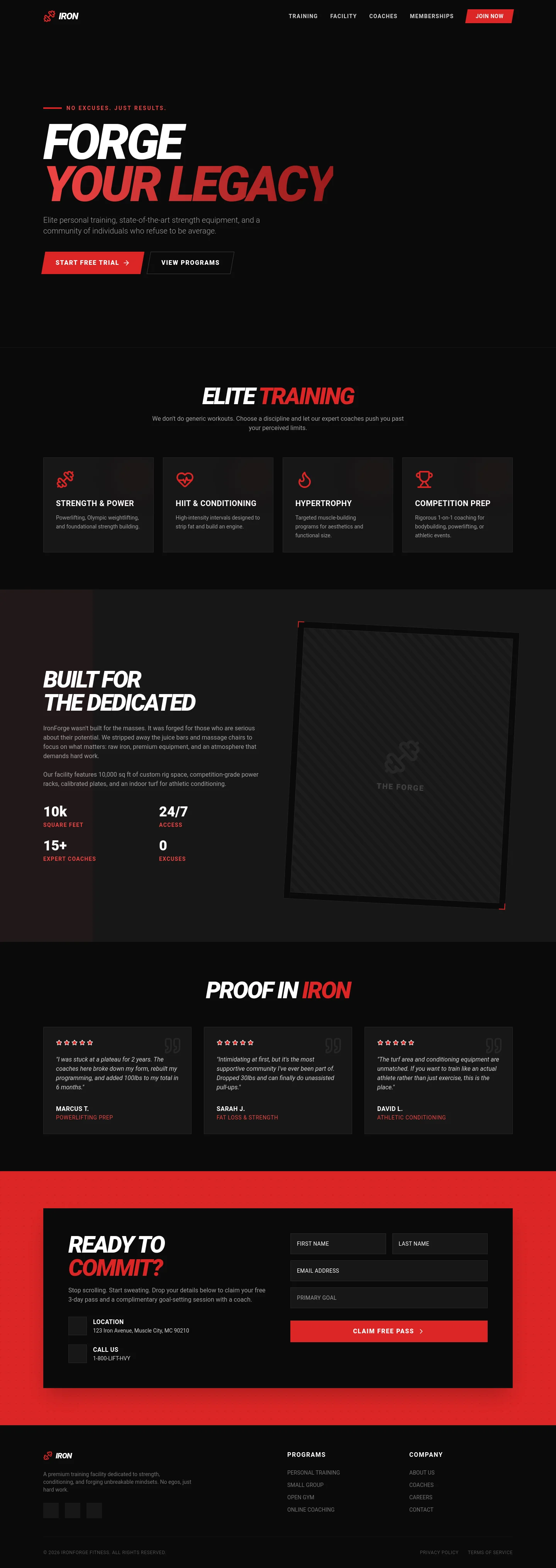
Black and red, heavy italic type, a free-trial button.
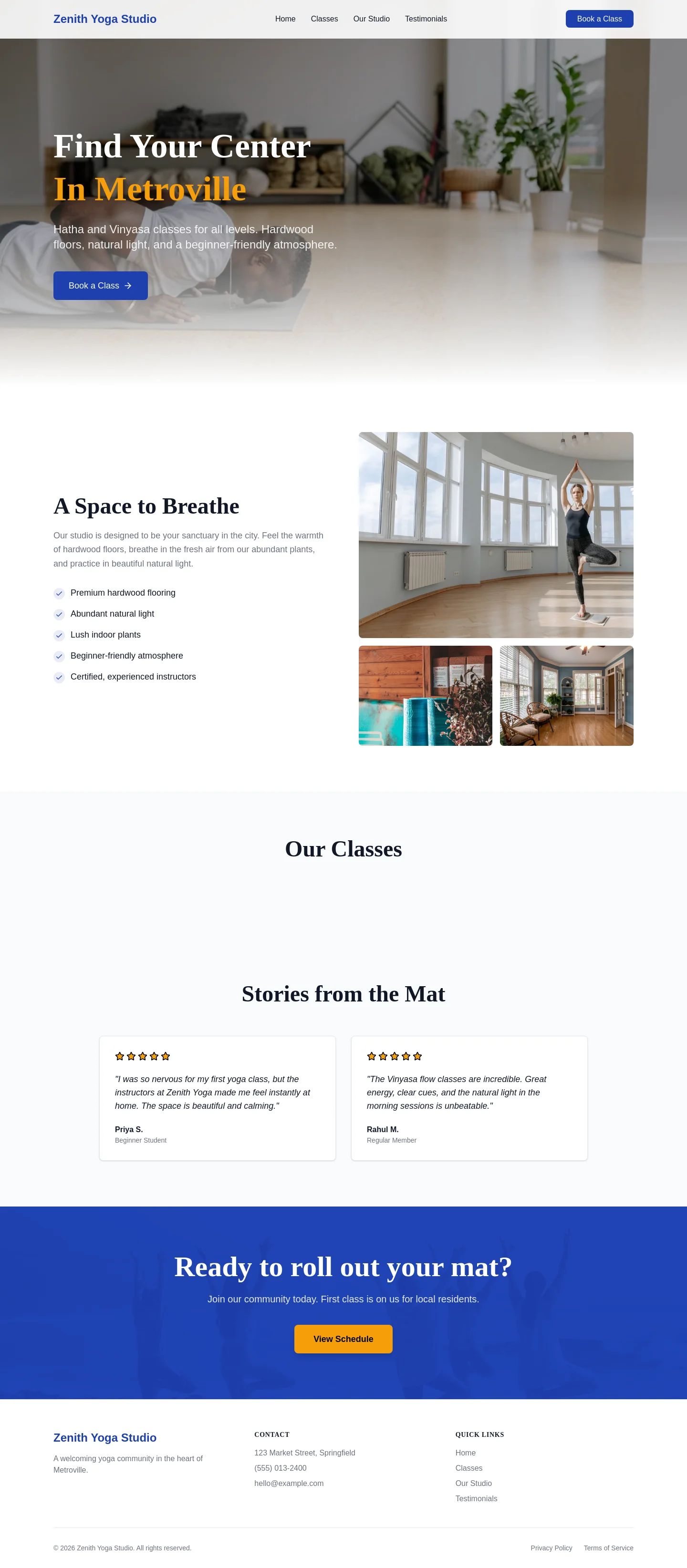
Light wood and white, a quiet serif, a book-a-class button.
Real generated sites, shown as demonstrations rather than customers. The gyms and everything written on them are invented.
See more in the galleryBeing straight with you
What it leaves to you.
Not your door system
There is no key fob, turnstile or check-in kiosk. Members book on your site; who gets through the door stays with your access system.
Recurring memberships need Stripe
Class packs can be paid through Stripe, Razorpay or PayPal. A membership that renews every month or year runs on your own Stripe account.
Calls in, never calls out
The Voice Agent answers incoming calls and takes callbacks. It will not phone members or put a caller through to the desk live.
What it costs
Build it for nothing. Pay when it goes live.
Going live needs Pro: one price per live site, per month, in your currency on the pricing page.
- Building, trying designs, previews
- Free
- Live on your domain, hosting, SSL
- Pro
- Class booking, packs, memberships, chat
- Included
- Members, bookings, page visits
- Not counted
- Voice Agent, text messages
- Per-site add-ons
- Reels, graphics, a logo
- Credits
Changing the site by hand, by chat or out loud never uses credits. Card fees go to your payment provider, and the phone provider bills the number and call minutes.
See pricing for your countryQuestions
Asked at the front desk.
Can people book a specific class on a specific day?
Yes. Each class has its weekly sessions with an instructor and a number of spots. Visitors pick a session from your timetable and book it. When a session is full they can join its waitlist.
Can I sell memberships and class packs?
Yes. Packs hold a number of classes and can expire after the days you choose. Memberships renew monthly or yearly through your own Stripe account. Members sign in on your site and book with what they hold.
How do I offer a free trial class?
Make a class free to book, or sell an intro pack of a few classes at a price you set. A follow-up email after the first visit can point people to the membership.
We have two locations. Does that work?
Yes. Add each branch with its own hours and timetable, and visitors choose where they want to train before picking a class.
We are a small yoga or pilates studio, not a big gym.
The same tools fit: a timetable, spots per class, packs and a calm design. Tell it about the studio and the three designs are drafted for a studio, not a weights floor.
We already have a website and a booking system.
Give us the site's address and its pages and words come across into a new design. If you want to keep your booking system, the Book buttons can link to it instead.
Your gym
Tell it about your gym and see three designs.
Building and comparing designs costs nothing, and nothing is public until you choose to go live.